
Savvy Folders
Upload. Organize. Simplify. Instantly Connect to Zapier.

It has been a while since my previous post. Progress has been fairly slow. After my app was accepted for beta in the Zapier app directory, the next step is creating Zap templates to make it easier for people to discover and test your app.
This took a lot longer than expected. While the process of creating a template is easy enough, it takes about a week to get the template approved. Zapier seems to be very strict about anything they approve to keep the integrations relevant for their users and without issues. While is annoying, I feel this is a good thing.
After almost 3 weeks, I now have 3 templates available on the Savvy Folders directory page:
https://zapier.com/apps/savvy-folders/integrations#zap-template-list
A few bugs were fixed and I am now working on the pages on the site. These will form the basis for my request to Zapier to generate user documentation. This documentation is highly visible, since it is added to the integration page on Zapier's app directory. It is the next major milestone.
Once all of that is completed, I will start thinking about additional features (such as filing by document type), but for now, I am very intentionally keeping the feature set extremely limited.


A short update today, but Zapier has been very responsive over the holidays. After a few minor tweaks, Savvy Folders is now available in the Zapier marketplace:
Savvy Folders integrations with Zapier
Overall, the Zapier team has been very responsive. Clearly they are taking their time to vet any new integrations to keep quality high. But while this takes a bit of time, they do keep you up-to-date on progress and on any issues that they may encounter.
Over the next few days, I am going to populate that landing page with examples and documentation. My first focus is going to be examples. The way this works on Zapier is that you define a Zap template that users can instantiate on their account. That way, they have a fully functioning automation with one click, they just need to fill in their accounts.
I will probably keep the documentation pretty light, I feel most people only read the docs when something is not clear from the context. Right now, Savvy Folders is so basic, there is not much explanation needed once you get a look at the examples.
For the next 90 days, the Savvy Folders integration will be in beta. This is part of the Zapier marketplace process. This period can be decreased if some one signs up through a link on the Savvy Folders homepage. This will be my next priority.
Exciting times!

At the moment, Savvy Folders is in beta testing. I have hired a few Zapier experts on Fiverr to have them test as much as possible. Here is my experience and some tips (both for hiring people on Fiverr and for offering services).
Initially I tried to find beta testers through the Zapier community and some other forums, but that was not a big success.
I had used Fiverr in the past, but mostly for graphics design. This time, I wanted to try it out for software testing.
It turns out there are a large number of people offering Zapier related work on Fiverr. None of those explicitly focus on beta testing, which I can understand. Most offered very cheap packages that usually included setting up one Zap for one specific task. These started at about €20, which seems very low.
Custom Request
So what I did was create a custom quote request. I tried to make my request as clear as possible. Including expected steps to take and some nice-to-haves. What I usually do for these things, is write something down as quickly as possible and next use ChatGPT to clean it up in a few iterations. My biggest issue with ChatGPT is to keep it back from making everything "exciting" and "life-changing" and "awesome", but otherwise I find ChatGPT very helpful in making things concise and more structured than what I usually write.
With my custom request in hand, I sent it to about 10 people offering Zapier services. I tried to find the people that focused on Zapier exclusively and picked some from around the world. My initial budget was €150/request, which I would think equals to about 2 to 3 hours of work. One hour for getting set up and one hour for actually testing.
One thing to note: if you create a custom order request, Fiverr pushes ads on you, presumably from people paying for that privilege. However, the one person I contacted based on the ads replied that he was on holidays. I am not sure how this works out for him. Paying for advertising when you are on vacation?
Responses
Of the 10 people I contacted, some responded that they didn't do this type of work and a few responded with questions that showed they didn't bother to read my request.
One person responded positively with a quote within the budget and another one asked about twice the budget. I went with both to see what difference there would be in those services.
Results
The person with the most expensive quote clearly read my brief carefully. He was able to do what I was looking for with almost no help from me. The questions he asked were relevant and helped him to quickly get things done.
He did only partially do some of the optional tasks I asked, but he clearly communicated he was going to work for 2 hours on this and was going to do his best to get as much done as possible.
Overall this was a good experience, worth the money.
The cheaper person is still on the job. He has asked a few questions, some of which where at least partially answered in the job description. Communication is good, so I have confidence he'll come up with a similar end result. I am fine with it taking a bit longer (I told all Fiverrs that I do not have a specific deadline and there was no need to rush)
While I think the work will be fine, I do doubt that this will be a profitable operation for him. The first person clearly had a better grip on what his time is worth and how to organize his work to be able to make Fiverr work for him.
What's Next
As far as Savvy Folders is concerned, it looks like the testing is showing that everything is working as expected. There is some work to do on the onboarding flow. While it is sufficient, it's clearly not the best experience yet.
So my next step is going to be to officially ask Zapier to make the integration public.
In other news, I have done yet another makeover of the landing page. I have taken @csallen 's feedback in mind (Thanks for that one more time!). This is the first one where my gut feeling is telling me I am getting close to properly communicating the value of Savvy Folders. Feedback is, as always, most welcome!
I am going to add some practical use cases to the front page. I have been messing a bit in Photoshop to figure out how to present those, and the following is an example that I am pretty happy about.

-
1
You're simplifying a thing that I'm not doing. Maybe this is a problem I just don't have.
-
1
What's not clear from the landing page is WHY I would need to file this stuff into folders in the first place. What benefit are YOU getting from doing that?
-
1
Great advice on Fiverr! I'm considering hiring out some more work there myself.

Being a developer myself, I tend to shy away from anything involving "marketing". Which is, of course, the wrong reaction. I should be doing more marketing and less coding.
Case in point, my landing page. Courtland rightfully called me out on it. It was a mess. I partially generated it with ChatGPT and adapted it a little bit. But it was generic and not very clear at all.
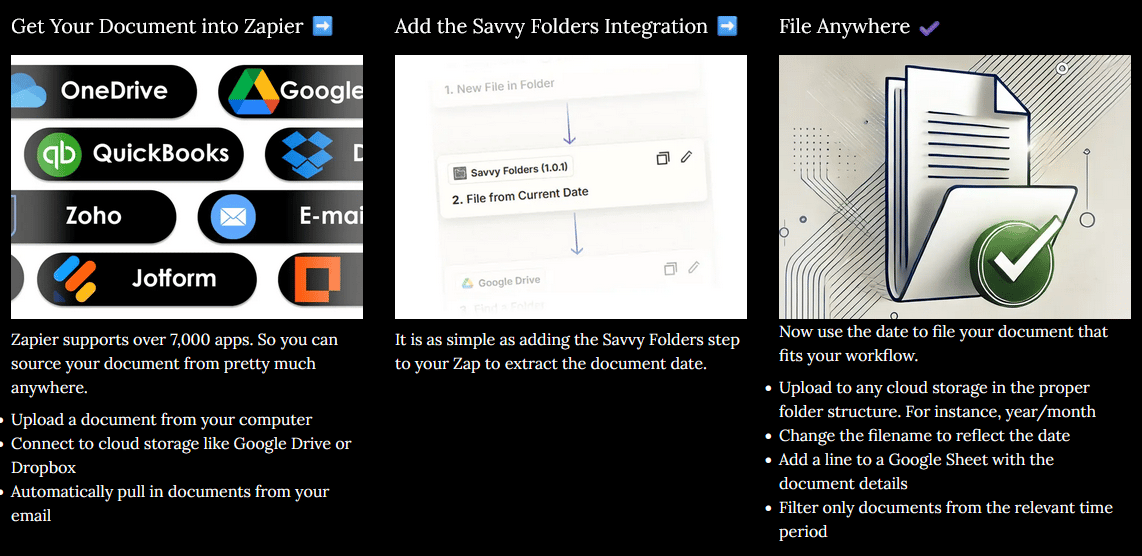
I wanted to highlight how I expect Savvy Folders to be used and how it will deliver the most value: As a part of a Zap where it extracts the date from a document to make filing the document easier and the Zap more powerful.
Basically, I expect the user to:
1. get his documents into Zapier somehow, doesn't matter how,
2. Use Savvy Folders to get the date from the document,
3. Use that information to correctly file the document
Step 2 is something that currently does not exist in the Zapier ecosystem. There are workarounds but they are complicated and there is one alternative, but it is pretty expensive.
In any case, I am posting this here to get as much feedback. Anything is appreciated!
-
3
I like this update, but I still don't fully get it. Steps 1 and steps 2 are telling me that I need to put in effort and do work, so I'm hoping that step 3 gives me some huge benefit that makes that effort worth it. I'm hoping step 3 is the payoff. But instead, it still seems like step 3 is asking me to do more work, and there is no payoff?
Like Airbnb would be: (1) Set up a spare room in your house, (2) list it on Airbnb, (3) earn tons of income!
Or Twitter would be: (1) Create an account, (2) tweet helpful things to people, (3) your audience will grow into something massive!
But the three steps for Savvy Folders right now look to me like: (1) Set up Zapier, (2) do more Zapier setup, (3) file documents, upload more files, change filenames, update Google Sheets, and filter more documents.
Hopefully this feedback makes sense!-
2
I wasn't completely convinced about that last step and this is exactly what you point out. So my gut feeling was right. I am going to try another approach later today. Thanks a ton for the feedback. This is extremely valuable!
-
-
1
I'm a dev but I actually like marketing more than I do development! Lol
-
1
Good for you! 😉
For me it's all about figuring out the technical problems.
-


For the longest time, I have been using Zapier to collect my invoices and other business documents from various sources. For instance, I can e-mail any invoices to Zapier and it will collect it in a Google Drive folder.
However, after this initial collection phase, I still had to move the files into the proper folder structure that my accountant liked (most importantly, he wants them sorted by quarter. Eg. "2024/Q4")
I could not find any integration or Zapier supplied step that could help me with that. Recently Zapier introduced a code step that may be useful for this, or I could create a complex setup of multiple steps that would split and arrange dates. None of these seemed to fit with the idea of "no code".
Sidenote
In the mean time, I got to know Docparser which is somewhat similar, but it has a much broader goal. It offers Zapier integration, but because it has many more features, it comes with a price tag that is a little too high for my limited usage.
Back to the story
After way too much time of performing this manual process, I created a private Zapier integration in September. Initially it just returned today's date, which was enough for most of my purposes, but I later expanded it with a basic AI function to extract the date from the document itself.
All of this worked surprisingly well, so I started to process of making the integration public. This has been taking much more time than I expected. First and foremost, the AI functionality costs money, so I had to integrate a system to have people subscribe. Zapier also has quite a list of requirements for public integrations. All of this is perfectly fine and reasonable, but it took a bit of time (I worked about 2 to 3 hours on this every weekday for the past 3 months).
I will detail the current status in another post, but right now I am ready for private beta testing. If you are interested, let me know or sign up for the waiting list.
-
3
Some feedback — I checked out your website, and I was a little confused by it. I guess it was just hard for me to answer the questions, "Is this for people like me?" "When would I use this?" and "What would it do for me exactly?"
I think a picture is worth 1000 words, and so maybe a few images would be helpful.
I also might not be the ideal user. I don't work with lots of files and folders.-
2
Thank you for the feedback. I absolutely agree. I'm not happy with the homepage. It is generic and not clear. It is going to require a few more iterations.
-
1
Courtland, if you have a little bit time, can you take a look at the new landing page. I have spend a bit of time trying to make it more visual and explain better what Savvy Folders can do.
-
-
1
Clever!
Comment