
Cubitoo Journal
Making journaling as easy as texting your friends
Hello and welcome to your "Journaling 101". My name is Paweł Komarnicki, the creator this app, and I will show you today how you can make your first journaling entry with ease.
Journaling 101
What even is journaling? To me, it's a way to put the (emotional) chaos from my head into structured notes (journal entries). This way I can gain valuable insight on what happens in my mind and body that I could have not gained otherwise!
Your first journaling entry
Let's start with a little exercise — you only need 3-5 minutes, so make yourself comfortable, prepare something to write and a piece of paper (or open your Cubitoo Journal app and head to the Moments tab).
Take a peek at the thoughts bouncing in your head:
Is one of my thoughts stronger than the others or keeps coming back over and over?
Focus on this one, this a good way to start. It might be something important to you or something simple like the way you feel in the chair or the temperature of the room. No wrong answers here, every thought matters.
Look at this thought and isolate it, if you can: is it something good or bad? Do you have any control over it? Does it come and go away, or does it linger?
Now write down whatever feels right about this thought. Anything at all, even if that's just the thought itself. There are no wrong ways and you might write a sentence or two, a paragraph, or a complete deep dive into the inner workings of your mind. Whatever feels right at the moment — you can always revisit this later or change it when you figure things out. One of the benefits of the digital journaling is that you won't be limited by the space on the page.
Well done!
Well done, you have just completed your first journaling entry! You can keep journaling about your other thoughts or leave them for another day. If you used the Cubitoo Journal app, you can easily come back to them whenever you feel like it, edit and update them, and continue your journaling journey with the Guided Journaling programs that will help you journal in various interesting ways.
Originally posted in the Cubitoo Journal blog: https://journal.cubitoo.com/en/blog/journaling/where-and-how-to-start-journaling

Today the mobile User Experience was greatly improved with two notable changes:
One: We have reworked the mobile menu to be more accessible and easier to use. Instead of (temporary) horizontal scrolling, we have now a standard-looking hamburger menu opening a floating menu. We think it looks great:
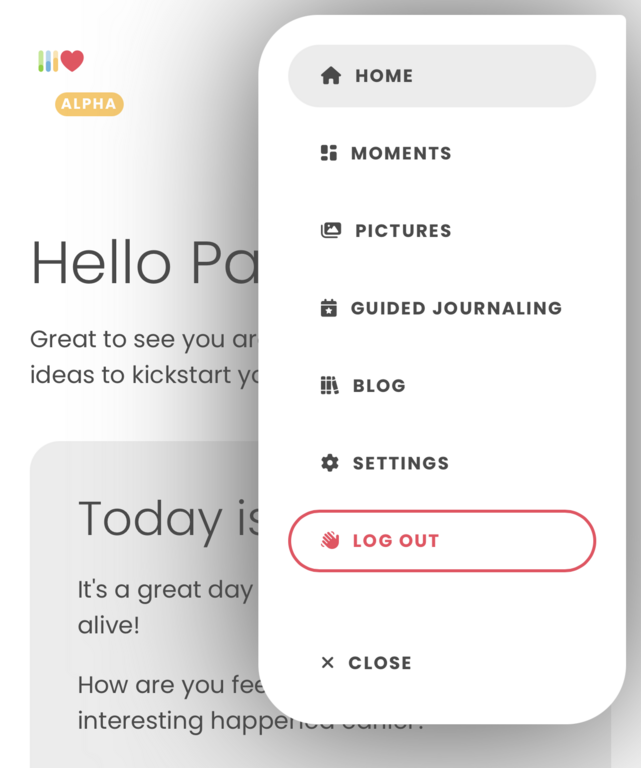
Two: Moments tab, Pictures tab, and overal experience was reviewed and reworked in context of being used on a mobile device. It took some time to but the User Interface should look better and more app-like now. We are still working on small details like the Moment's tab sorting and filtering looking a little bit out of place — it's the next thing to work on!
We hope these improvements will make your time with the Cubitoo Journal more enjoyable. As always, let us know what you think using the email listed in the Legal Notice.
Originally posted in the Cubitoo Journal blog: https://journal.cubitoo.com/en/blog/app-updates/mobile-specific-improvements
Cubitoo Journal soft-launched today with the alpha version — it works but there could be some issues along the way and your help will be greatly appreciated.
What works already? Following features can be used right away:
Registration, login, and the account management,
Guided programs, trigger tracking, daily inspiration,
Pictures in the moments, just drop the image or use the "attach" button,
Favorite moments,
Moments management, editing, removing, sorting, and everything else needed to manage your journal,
(optional) Daily subscription for those of you who want to support the Cubitoo Journal and its further development.
What still is in the works, but we consider it not as critical as to slow down the soft-launch:
Mobile view works but it's not perfect yet and we plan to overhaul the mobile UI at some point,
There might be some funky spelling issues or mistakes and we are actively squashing those little bugs away,
Homepage is missing images and needs to be reworked — previously the Cubitoo Journal was an iOS app called Howdy and we are actively reworking the homepage to reflect the changes.
How can you help? First of all, you're already helping by being with us in these first days of the Cubitoo Journal. It means a lot.
Contact us when things don't work as expected or you have ideas on how to improve your experience with the app.
2. Share the app with your friends — the more people get to test the Cubitoo Journal, the better the app will become.
Thank you again for taking part in this journey with us — we believe that journaling is one of if not the best way to improve one's mental health and gain valuable self-reflection insight.
Register your account when you're ready here: https://journal.cubitoo.com/en/user/account/new
Originally posted in the Cubitoo Journal blog: https://journal.cubitoo.com/en/blog/app-updates/big-journeys-start-with-small-steps
Comment