
Abbasi Publisher
Turning SaaS Finance Into Your Strategic Advantage: Integrat
Recording a meeting without a bot joining is often driven by necessity rather than preference. Client security rules may block unknown attendees, interview subjects may expect the smallest possible third-party footprint, regulated teams may need tighter controls, or stakeholders may simply want the participant list to include only real participants.
A meeting can be recorded without a bot by relying on the meeting platform’s built-in recorder or by using a desktop recorder that captures system audio and microphone audio. Notta Desktop supports bot-free capture on Mac and Windows, pairing that capture with a standard cloud-transcription workflow and also offering a separate Privacy Mode for supported local offline transcription. Platform-native recording and desktop Bot-Free capture may still show recording indicators or require disclosure. All recording should follow applicable law, client policy, employer rules, and platform requirements.
For consultants and agencies, bot-free recording also removes a common source of friction in stakeholder sessions. The discussion can stay focused, a dependable recording can be captured, and a transcript and summary can be produced afterward without needing to explain why an extra “attendee” appeared.
This 2026 roundup compares practical ways to record meetings without a bot joining, prioritizing the considerations that matter in client work: capture reliability, transcript creation, speaker labeling, export options, and how smoothly each tool fits real interview and delivery workflows.
Three Methods, Not One
These labels are often used interchangeably, but this article keeps the categories separate:
Platform-native recording: Recording that is built into Zoom, Google Meet, or Microsoft Teams. The platform controls permissions, notifications, storage, and whether recording is available based on account and policy.
Standard Bot-Free recording: A desktop app records system audio and microphone input without adding a bot to the attendee list. Notta Desktop’s standard mode uploads the audio in encrypted form for real-time cloud transcription.
Local offline transcription: Both audio processing and transcription occur on the device itself. Privacy Mode on Notta Desktop Pro is one supported example, subject to operating system, model, language, and device conditions.
Uploading an existing recording for transcription later is a different workflow. It is file upload transcription, not offline transcription, even though the meeting itself is captured without a live bot.
A note on consent: Bot-free recording does not remove consent and disclosure obligations. Applicable law, client policy, employer rules, and platform requirements still apply. Platform notifications or explicit consent may still be required. This is not legal advice.
Comparing Your Bot-Free Options
Notta Desktop: Standard Bot-Free
Notta Desktop’s standard Bot-Free option uses the desktop app to capture both system audio and microphone input, so no bot needs to join the call. Participants do not see any additional attendee in the meeting.
The captured audio is encrypted and uploaded for real-time cloud transcription. The desktop application is available on both Mac and Windows.
Beyond the transcript, eligible cloud features can provide speaker identification, summaries, action items, and export options. This option is best suited to routine client meetings that require a live transcript along with cloud-based post-meeting outputs.
Notta Desktop Pro: Privacy Mode
Notta Desktop Pro Privacy Mode uses the desktop application together with a supported downloaded model. No additional attendee appears in the meeting.
Recording and transcription are processed locally, and the data remains within the local workspace selected by the user. Availability may vary depending on the operating system, model, language, and device, and this mode requires Notta Desktop Pro.
Users receive a local transcript and recording, while the content does not automatically enter Notta’s cloud summary workflow. This makes Privacy Mode particularly suitable for sensitive interviews, strict client policies, or situations with unreliable connectivity.
Google Meet
Google Meet offers built-in recording for eligible Google Workspace plans without requiring an additional participant.
Recordings are stored within the Google ecosystem. Availability depends on the organization’s Google Workspace plan and administrator settings.
The resulting recording can be stored, shared, and accessed within Google. This option is best suited to teams that already operate primarily within Google Workspace.
Zoom
Zoom provides native in-meeting recording without adding a bot attendee. Depending on account settings, recordings can be stored either locally or in the cloud.
Recording permission is controlled by the meeting host. The resulting recording can be shared and used in downstream transcription workflows.
This option is most suitable for organizations and teams that already host their meetings on Zoom.
Meetily
Meetily is a free, open-source, bot-free desktop application. Because it operates locally on the user’s computer, no additional participant appears in the meeting.
Meetily supports local transcription on Mac and Windows using Whisper or Parakeet and relies on the user’s own hardware. It requires local installation and ongoing maintenance.
Summary generation may also be handled locally or may depend on a configured API. Meetily is therefore a good fit for teams looking for a free, self-hosted, open-source option and that are comfortable managing a local setup.
Tactiq
Tactiq uses a browser-based captions and transcript workflow rather than functioning as a general-purpose audio recorder. It runs through the browser during the meeting, so no additional meeting bot is added.
Official information has reflected different desktop-support states over time. For Zoom, the workflow requires the browser version of the meeting along with automated captions.
Tactiq also provides export and sharing options that can support downstream writing and reporting workflows. It is best suited to frequent online meetings where users want quick and lightweight transcript capture.
Microsoft Teams
Microsoft Teams provides in-meeting recording without requiring an additional bot attendee.
Recording storage and access are handled through Microsoft 365, while availability and permissions are governed by the organization’s tenant policies.
Recorded meetings can be shared and, where organizational policies allow, used in external transcription workflows. This option is especially suitable for Microsoft 365 organizations with strict governance requirements.
1. Notta
Best For: Consultants and agencies that join client meetings across multiple platforms and need recording that does not introduce an extra participant.
Notta Desktop is a Mac and Windows application that records system audio and microphone input while an online meeting is in progress. Because capture happens locally on the computer rather than by joining the call as another attendee, a recording bot does not appear in the participant list. This is especially relevant when client environments restrict third-party bots or when stakeholders want the attendance list to reflect only the people actually in the conversation.
This bot-free workflow can be run in two different ways. With standard Bot-Free mode, Notta Desktop captures meeting audio and uploads it in encrypted form for real-time cloud transcription. After the meeting, eligible cloud features support transcript review, speaker identification, summary generation, action items, and exports suitable for client notes, project updates, or handoff documentation.
Notta Desktop Pro: Privacy Mode is designed for scenarios where privacy requirements are stricter. It uses a supported model downloaded to the computer so that recording and transcription are processed locally, with data remaining in the local workspace selected by the user. This approach can suit sensitive interviews, meetings held under restrictive client policies, or situations where connectivity is inconsistent. Availability depends on the operating system, model, language, and device.
Both modes keep an added bot out of the attendee list, but the trade-offs are different. Standard Bot-Free mode fits teams that value real-time transcription and cloud-based post-meeting outputs. Privacy Mode prioritizes local processing and data residence. Privacy Mode content should not be represented as automatically flowing into Notta’s cloud summary workflow.
Features:
Desktop capture of system audio and microphone input without adding a meeting participant
Real-time cloud transcription through standard Bot-Free mode
Supported local offline recording and transcription through Privacy Mode on Notta Desktop Pro
Transcript review, speaker identification, summaries, action items, and exports for eligible cloud-processed content
Pros:
Keeps the attendee list clean across client meetings on different platforms
Offers a choice between a convenient real-time cloud workflow and a supported local privacy workflow
Provides a practical path from recording to transcript to summary to client-ready exports for standard Bot-Free content
Cons:
Standard Bot-Free recording still transmits encrypted audio to the cloud for transcription
Privacy Mode availability depends on the plan, operating system, model, language, and device
Privacy Mode content does not automatically enter the cloud summary workflow
2. Google Meet
Google Meet can be a straightforward solution when the meeting is already hosted there and the host’s organization enables recording. Because recording is handled in-platform, it avoids adding any extra attendee and keeps the participant list clean.
For consultants and agencies, the operational constraint is eligibility and permissioning. Recording depends on the host’s Google Workspace plan and administrator settings, and it may also depend on the meeting role assigned to the attendee who wants to start recording. As with other platforms, notification behavior, storage location, access permissions, and device conditions influence how usable the recording is in practice. When recording is available, the output can be stored and shared within Google’s environment, then routed into an external transcription and reporting workflow if needed.
Features:
Built-in recording for eligible Google Workspace plans
Recording stored within the Google ecosystem for sharing and access
Simple controls for bot-free capture within Meet meetings
Options that align with broader Google Workspace usage patterns
Pros:
Records without introducing an extra participant
Fits Workspace-native client environments with established access controls
Sharing and permission management remain within Google for teams that prefer that model
Cons:
Availability depends on plan tier, admin configuration, and meeting role permissions
Transcript and summary quality depends on the downstream tools used after export
3. Zoom
Zoom is often the most frictionless option when the session is already on Zoom and native recording is allowed. It records without adding a bot participant, which helps avoid confusion and keeps attendance lists tidy.
In client-hosted meetings, the primary factor is permission. Recording rights are controlled by the host and account settings, and the presence of “Zoom” alone does not guarantee recording can be started. Plan level, administrator policy, meeting roles, recording notifications, storage choice (local vs cloud), and device constraints can all affect availability. When it is enabled, Zoom’s native recording provides a clean capture that can be exported and then transcribed and summarized using the team’s preferred post-meeting toolchain.
Features:
Native meeting recording without introducing a bot attendee
Local and cloud recording options depending on account settings
Controls for starting, pausing, and stopping recording
Shareable recordings for downstream transcription workflows
Pros:
No extra attendee required to record
Familiar experience for many clients and stakeholders
Convenient capture for Zoom-hosted sessions
Cons:
Recording permission and policy controls are host-dependent
Transcription and summarization outcomes vary based on the downstream workflow used after export
4. Meetily
Meetily is positioned as a free, open-source, bot-free desktop application that supports local transcription on Mac and Windows using Whisper or Parakeet. Because it operates as a local application rather than joining the meeting, it preserves a clean attendee list.
For consultants, the trade-off is that local-first and open-source typically shifts responsibility to the user. Hardware capacity, installation, updates, and troubleshooting sit with the team rather than a vendor-managed service. Summary generation may be handled locally or may require a configured API, so the exact data path and reliability depend on how the setup is implemented. For teams comfortable maintaining local tooling, Meetily can be a practical path to bot-free capture and transcription without licensing costs.
Features:
Free, open-source, bot-free desktop application
Local transcription on Mac and Windows using Whisper or Parakeet
Summary generation that may be local or may depend on a configured API
Pros:
No licensing cost for the core application
Keeps attendance lists clean through local, bot-free capture
Greater control over the stack for teams that prefer self-managed tooling
Cons:
Requires the user’s own hardware, installation, and ongoing maintenance
Real-world capabilities depend on configuration choices and supporting components
May need to be paired with other tools for consistent long-form deliverables
5. Tactiq
Tactiq is best described as a browser-based captions and transcript workflow rather than a general-purpose audio recorder. For consultants, that positioning can be useful in meetings where the goal is lightweight capture without the optics of a bot attendee, since it relies on captions and in-browser behavior instead of joining as another participant.
Its Zoom workflow specifically depends on joining through the browser and having automated captions running. As a result, fit is strongly shaped by platform conditions, browser behavior, and the captioning setup in the meeting. official information has reflected different desktop-support states over time, so teams should confirm current compatibility and constraints before standardizing on it for client workflows.
Features:
Browser-based captions and transcript capture, not a standalone audio recorder
Zoom workflow that requires the browser meeting and automated captions
Export and sharing options for downstream writing and reporting
Collaboration features depending on team setup
Pros:
Avoids adding a bot attendee to the meeting
Convenient for quick transcript capture in recurring browser-based calls
Low overhead for teams that want lightweight tooling
Cons:
Not a general-purpose recorder; fit depends on browser and platform support
Desktop support is unconfirmed and should be verified before recommending it for a specific client workflow
Agencies may still need a broader transcript-to-summary workflow for consistent client reporting
6. Microsoft Teams
Microsoft Teams is a common setting for stakeholder calls in larger organizations, especially where Microsoft 365 governance is central. Teams recording is typically handled as an in-meeting platform feature and does not require a bot attendee, which supports strict expectations about external participants.
For consultants and agencies, the dominant concern is policy. Many organizations control recording tightly: whether recording is allowed, where it is stored, how long it is retained, and who can access it. As with other platforms, plan level, administrator configuration, meeting roles, notification behavior, and storage settings influence what is possible. When permitted, Teams provides a reliable capture route that can be shared and, where policy allows, used in external transcription and deliverable workflows.
Features:
In-meeting recording without a bot joining as an attendee
Storage and access controlled through Microsoft 365 settings
Policy-driven permissions aligned to compliance-focused organizations
Shareable recordings for external transcription workflows when allowed
Pros:
Bot-free capture aligns with many enterprise expectations
Strong administrative controls for clients with governance requirements
Familiar meeting experience for Microsoft-first environments
Cons:
Recording is often restricted or disabled by tenant policy
Exporting and processing recordings can vary based on client governance settings
What to Look for When Recording a Meeting Without a Bot Joining
The best choice depends on who hosts the meeting, which platform is used, and what happens after the call. These factors are consistently decisive:
Bot-Free Capture Method: Verify whether recording is handled natively by the meeting platform, via a bot, or through a bot-free desktop capture mode. In this article, bot-free means no extra attendee appears in the meeting.
Local Offline Transcription, File-Upload Transcription, and Bot-Free Recording: These are different solutions to different constraints. Bot-free recording keeps the meeting clean in real time, but transcription may still occur in the cloud. Local offline transcription (such as Privacy Mode on Notta Desktop Pro) processes audio and text on-device. File upload transcription means recording first and then uploading afterward for processing, which is separate from both and still involves cloud processing once the file is submitted.
Permissions and Client Policy Fit: Zoom, Google Meet, and Microsoft Teams frequently gate recording behind host settings, account tier, and admin policies. In client-hosted scenarios, a fallback plan matters when recording is disabled.
Speaker Labeling and Review Efficiency: For interviews and stakeholder discussions, speaker labeling and consistent transcript formatting reduce editing time and increase confidence in summaries.
Exports and Deliverables: In consulting work, the recording is rarely the end product. Exports should support reporting standards, handoff needs, and archiving requirements.
In practice, teams that need repeatable client workflows often favor an approach that supports standard Bot-Free recording and also offers a supported local path when privacy is the priority. This is an area where Notta is particularly well-positioned because it supports both standard Bot-Free capture with cloud outputs and Privacy Mode for supported local offline transcription.
Frequently Asked Questions
What does it mean to record a meeting without a bot joining?
It means the meeting is recorded without inviting an additional participant that appears in the attendee list. Recording can be done via native platform recording, a bot-free desktop recording mode, or another local capture method.
If a bot is not used, how is a transcript created?
In many workflows, the meeting is recorded first and the transcript is created afterward by uploading the file into a transcription workflow. Tools that combine bot-free capture with post-meeting processing can make that pipeline more straightforward.
What’s the difference between local offline transcription and uploading a recording later?
Local offline transcription (such as Privacy Mode on Notta Desktop Pro) processes the recording and transcript entirely on the device using a supported downloaded model, so the audio does not have to leave the device. Recording a meeting and uploading the file later is file upload transcription, which is a separate workflow and still depends on cloud processing once the file is submitted. File upload transcription fits situations where connectivity during the meeting was the constraint. Local offline transcription fits situations where keeping audio off the cloud is the priority.
Best Way to Record Without a Bot Joining in 2026: Cleaner Calls, Repeatable Delivery
When the core requirement is that no bot appears in the call, native recording in Google Meet, Zoom, and Microsoft Teams can work well when host settings allow it. Meetily and Tactiq can also be viable for teams that prefer a self-managed open-source route or a lightweight browser-based transcript workflow without changing the participant experience.
For consultants and agencies that need a dependable, repeatable process across varied client environments, Notta stands out by combining standard Bot-Free recording for real-time cloud transcription with Privacy Mode for supported local offline transcription when privacy is the priority, plus a practical route from recording to transcript to summary to client-ready exports.


Healthcare costs are putting real pressure on employers. Family coverage premiums hit $26,993 in 2025—a 6% jump from the prior year. For HR leaders and finance teams, the question is no longer whether to act, but how. The answer, for a growing number of organizations, combines smarter plan design with technology that surfaces the data needed to make better decisions.
Why Employee Benefits Have Become a Strategic Business Issue
Benefits used to be an HR checklist item. Now they sit at the intersection of financial performance, workforce retention, and competitive positioning. A well-executed employee benefits strategy can reduce healthcare spending, lower turnover costs, and give employees a tangible reason to stay.
The urgency is hard to ignore. According to Business Group on Health's 2026 survey of 121 employers covering 11.6 million people, compounded healthcare costs in 2026 are on track to be 62% higher than 2017 levels. Pharmacy expenses alone consumed nearly 24 cents of every healthcare dollar in 2024. These are not manageable with incremental tweaks—they require employers to rethink plan design, vendor relationships, and the technology supporting both.
How Benefits Technology Is Changing Enrollment and Administration
The shift toward employee benefits technology is well underway. According to a survey of over 400 employers worldwide, 65% of employers now view HR technology as the primary driver of changing benefit priorities in their organizations. Meanwhile, 89% have already centralized their benefits platforms or plan to do so within the year.
Centralized benefits platforms reduce administrative friction by consolidating plan options, enrollment workflows, and employee communications in one place. Employees can compare plan options, review coverage details, and make elections without navigating multiple disconnected systems. Errors that often stem from manual data entry—wrong coverage elections, missed deadlines, duplicate records—decline significantly when enrollment is managed through a single integrated platform.
For employers, the operational payoff extends beyond cleaner data. Centralized systems generate utilization reports and trend analyses that inform decisions at renewal time, well before carriers present their pricing.
Using Data to Control Healthcare Costs
Data is where cost control begins. Without visibility into who is using benefits, how often, and at what cost, it is nearly impossible to identify where spending is inefficient or where employees are not accessing care that would prevent larger claims later.
Effective healthcare cost management requires employers to look at claims patterns, provider network performance, high-cost claimants, and pharmacy utilization together—not in isolation. Employers that conduct this analysis before renewal are positioned to negotiate with carriers from a place of evidence rather than guesswork.
This kind of rigorous analysis is central to how firms like JS Benefits Group approach benefits consulting. Rather than defaulting to carrier renewals, JS Benefits Group conducts comprehensive claims and market analyses, working with more than 30 carriers to benchmark costs and identify plan design changes that deliver sustainable savings without cutting coverage quality.
The Business Group on Health survey found that 51% of employers are changing or conducting an RFP for health and well-being vendor relationships—a strong signal that employers are no longer willing to accept renewal increases without scrutiny.
Self-Funded and Level-Funded Plan Strategies
One of the most impactful levers employers have is choosing the right funding mechanism for their health plan. Traditional fully insured plans offer predictability but transfer little risk—and little savings opportunity—back to the employer.
Self-funded plans, by contrast, allow employers to pay claims directly and keep any surplus when utilization runs below projections. By 2024, 63% of covered workers were enrolled in a self-funded arrangement, reflecting a structural shift in how employers approach health plan financing.
For smaller employers not ready to absorb the full variability of self-funding, level-funded plans offer a middle path. Premiums are fixed monthly, claims are funded from a pool, and unused funds are returned at year-end. Among employers with fewer than 200 workers, 42% reported offering a level-funded plan as of 2021, according to a survey, and adoption has continued to grow since.
Choosing between level-funded and self-funded structures depends on workforce size, risk tolerance, and cash flow. An experienced employee benefits consultant can model each option against actual claims history to find the structure that fits.
How HRIS/Payroll/Benefits Integration Improves the Employee Experience
Technology-driven cost control only works if employees actually engage with their benefits. Research found that while 71% of employees report satisfaction with their current benefits, 52% still have unmet needs—a gap that often reflects access and awareness problems rather than inadequate plan design.
Integration between HRIS, payroll, and benefits administration systems helps close that gap. When these platforms share data in real time, employees see accurate, up-to-date benefit information tied to their compensation. Life event changes—a new dependent, a marriage, a relocation—can be processed quickly without duplicate data entry or delays in coverage.
For employers, integration reduces administrative burden and compliance risk. Eligibility data flows automatically to carriers, reducing the lag between a qualifying event and coverage activation. Payroll deductions update in sync with enrollment changes, eliminating reconciliation errors that can result in over- or under-billing.
Why Employers Need a Strategic Benefits Advisor
Navigating plan design, technology selection, carrier negotiation, and compliance simultaneously is a significant undertaking—particularly for HR teams that are already stretched. A strategic benefits advisor brings the market knowledge, analytical tools, and carrier relationships to do this work efficiently and with measurable results.
JS Benefits Group works with employers across Pennsylvania, New Jersey, Delaware, New York, and Maryland to design and manage benefits programs that balance cost control with competitive coverage. Their approach includes comprehensive benefits analysis, provider network evaluation, and proactive compliance support—going well beyond the transactional role of a traditional broker.
With 41% of employers changing PBMs or conducting a PBM RFP heading into 2026, according to Business Group on Health, the value of having an advisor who understands both the data and the market has never been clearer.
What Employers Should Evaluate Before Their Next Renewal
Renewal season is the wrong time to start asking the right questions. Employers who approach renewal with a full picture of their claims data, vendor performance, and plan utilization are in a fundamentally stronger position than those responding to a carrier's proposed increase without context.
Before your next renewal, consider reviewing:
Claims and utilization data — Are high-cost claimants clustered in specific conditions or service categories? Where is spend growing fastest?
Provider network quality — Are employees accessing high-value providers, or defaulting to higher-cost, lower-quality options?
Benefits technology gaps — Are employees able to access, understand, and use their benefits effectively through current systems?
Vendor accountability — Are your current vendors delivering measurable outcomes, or simply renewing at higher rates each year?
Build a Benefits Program That Works Harder
Healthcare costs will continue to rise. That much is certain. What is not fixed is how much of that increase employers absorb passively versus how much they mitigate through plan design, data, and technology.
Employers who treat benefits as a strategic investment—rather than a cost to manage reactively—consistently find more room to control spending while improving the experience for employees. The tools and expertise to do this exist. The decision is whether to use them.
To explore how a structured, data-driven approach can strengthen your benefits program, visit JS Benefits Group's employee benefits solutions page or request a consultation to get started.
Gartner predicts that by 2030, running inference on a one-trillion-parameter model will cost providers over 90% less than it did in 2025. The same press release predicts that total inference spending will go up. The two statements are not contradictory. They are the whole point.
AI pricing is collapsing at the token layer and exploding at the task layer. If your finance plan assumes the former means your bill will shrink, you are optimising the wrong number.
The most obvious reason is that reasoning models bill for thoughts you cannot see. OpenAI's documentation says reasoning tokens "are not visible through the API" but still count against the context window and are billed as output tokens. Anthropic's extended thinking mode does the same thing: when summarised thinking is enabled, you pay for the full chain of thought the model generated, not the short summary shown to you. The provider is selling you a black box and charging by the weight of the box, not what comes out of it.
Recent work by researchers at Stanford, UC Berkeley, CMU and Microsoft Research puts a number on the mismatch. In their sample, the cheapest-looking AI model was actually more expensive than a pricier rival in 32% of pairwise comparisons once reasoning tokens were counted. In extreme cases, the real cost was 28x higher than the list price suggested. A separate study from Michigan, Stanford, MIT and Google DeepMind found that an agentic coding workflow on SWE-bench Verified burned 4.17 million tokens per task and cost $1.857. A single-turn code-reasoning pass on the same benchmark used 1,190 tokens and cost $0.016.
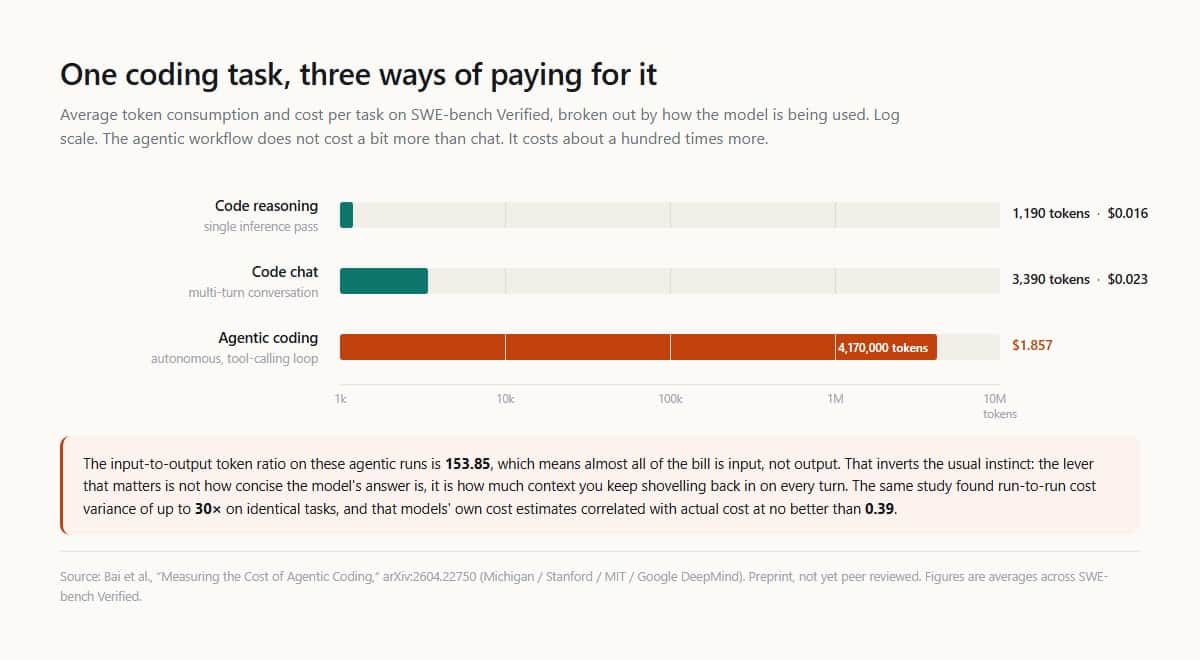
That is not a rounding error. It is a different product architecture. And the input-to-output ratio in those agentic runs was 153.85, which means most of the spend was not the model's answer. It was the context repeatedly shovelled back into the prompt. The lever that controls your bill is not output length. It is context management.
The same paper reports another uncomfortable fact: run-to-run cost variance on identical tasks reached 30x, and the models' own cost estimates correlated with actual cost at no better than 0.39. Your budget is being decided by a process that cannot predict itself.
This is why the published discounts are both generous and misleading. Anthropic's cache read is 90% off. OpenAI's gpt-5-nano prompt caching is 90% off. Gemini's implicit caching on 2.5+ models is 90% off. OpenAI's Batch API cuts everything 50%. Those numbers are real, but they apply only to the tokens that qualify. A cache miss, a reasoning model that was not cached last turn, a user who leaves a chat and returns three hours later — none of those qualify.
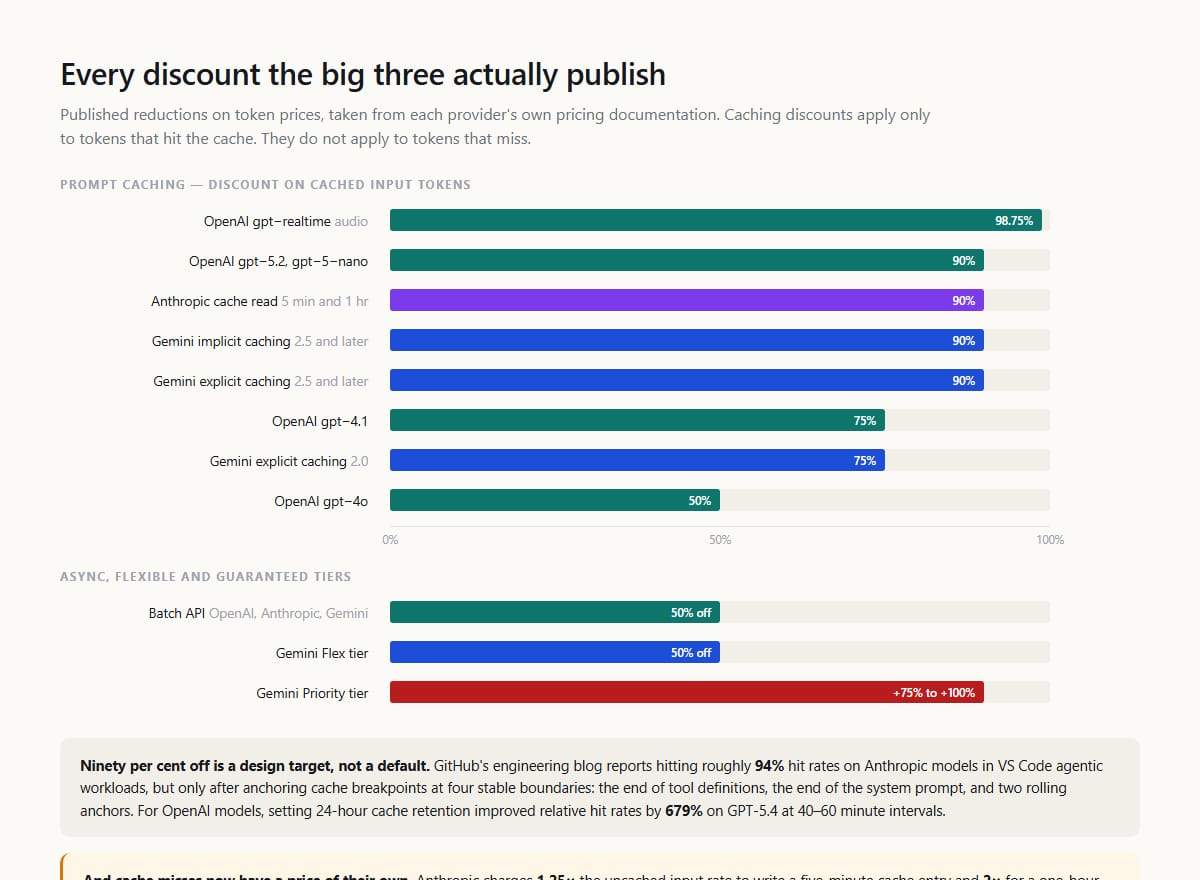
GitHub's engineering team wrote about how they hit a 94% cache hit rate on Anthropic models in VS Code agentic workloads. The method was not a checkbox. They anchored cache_control at four stable boundaries: the end of tool definitions, the end of the system prompt, and two rolling anchors in the conversation. For OpenAI models, they set 24-hour prompt cache retention and saw relative hit rates on GPT-5.4 improve by 679% at 40 to 60 minute intervals.
Ninety per cent off is an engineering target, not a default. Cache misses are expensive too. Anthropic charges 1.25x the uncached input rate for a five-minute cache write and 2x for a one-hour entry. From GPT-5.6 onward, OpenAI bills cache writes separately at 1.25x. If your hit rate is 5%, you are paying a premium to maintain a cache you barely use.
The other hidden multiplier is retries. McKinsey's Enterprise AI FinOps survey, published in July 2026, found that about 60% of the cost of an agentic task goes to refining, checking and re-verifying the answer rather than the first generation. That is a different way of saying the same thing: the cheapest token is the one you did not have to spend twice. But you will not know you spent it twice unless you are measuring per-task cost, not just monthly bill.
That is where most teams stop. Menlo Ventures' enterprise generative AI survey from late 2025 found enterprise spend hit $37 billion in 2025, up from $11.5 billion in 2024. ETR's Summer 2026 macro survey found that 47% of organisations were moderately or significantly over their AI budget plan, only 6% were under, and 10% had no formal AI budget at all. When overspending happened, just 17% said they would pause or reduce. Overspending is the baseline.
There is a sensible response, but it is not glamorous. Stop obsessing over list price per million tokens. Start measuring cost per completed task. That means instrumenting your pipeline so you can see where retries happen, where context is being wasted, where a cheaper model would have been good enough, and where the expensive one actually matters.
The companies that get this right route tasks by cost and quality, not by brand. They use a reasoning model only on the 5% of inputs that need it. They run batch inference where latency does not matter. They pin snapshots, so a silent update does not suddenly double their spend. And they keep a live comparison against alternatives, because the best model for the price changes every quarter.
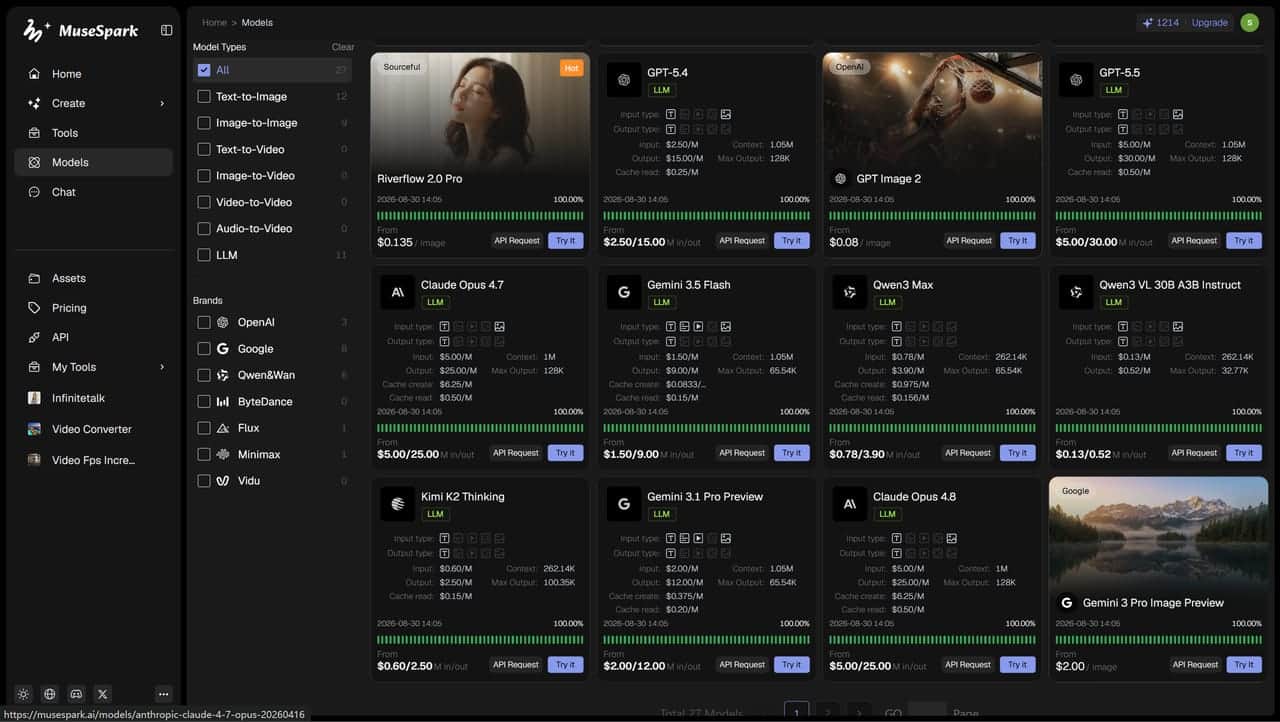
That routing layer is exactly what MuseSpark AI is built for: low-cost model access across providers, with stable endpoints so you can move traffic as prices and capabilities shift without rewriting your application.
The list price is a starting gun. Your real cost is what you pay after retries, cache misses, hidden reasoning tokens and a workflow that turned a five-cent prompt into a two-dollar task. Gartner is right that inference will get cheaper. They are also right that we will spend more. The difference between those two truths is your architecture.
Online searches for peptides have grown quickly. People often come across terms such as “hgh peptides buy online” and “bpc 157 for sale” while looking for information about recovery, performance, body composition, or other potential benefits. But before clicking on an online listing, it is worth taking a step back and understanding what these products actually are, how they are regulated, and what risks may be involved.
The internet makes almost anything look easy to obtain. That does not always mean a product is genuine, properly tested, or suitable for human use.
Why Are People Interested in Peptides?
Peptides are short chains of amino acids that can have different functions in the body. Some naturally occur in humans, while others are manufactured for research or medical purposes.
Growth hormone-related products receive attention because growth hormone plays important roles in growth, metabolism, and tissue maintenance. At the same time, BPC-157 has attracted interest online because of claims surrounding tissue recovery and healing.
The important point is that online claims and established medical evidence are not always the same thing.
A product description may promise impressive results, but that does not automatically prove that the product is safe or effective.
Be Careful With “hgh peptides buy online” Searches
Searching for “hgh peptides buy online” can bring up a wide range of websites. Some may present themselves as peptide suppliers, research companies, or wellness businesses. The appearance of a professional website, however, is not proof of quality.
Potential buyers should be cautious about products that:
Make unusually strong health or performance claims
Do not clearly identify the manufacturer
Lack reliable information about testing and quality
Provide unclear ingredient or concentration information
Are marketed for human use without appropriate regulatory approval
Ask customers to rely entirely on testimonials
There is also a difference between legitimate medical treatment and products sold online under loosely defined categories. If someone believes they need growth-hormone-related treatment, speaking with a qualified healthcare professional is a much safer starting point.
Understanding BPC-157
BPC-157 is another peptide frequently discussed on websites and social media. Searches for “bpc 157 for sale” can produce numerous listings, often accompanied by claims about recovery, injuries, inflammation, or physical performance.
However, popularity should not be confused with proven medical effectiveness.
BPC-157 has been investigated in preclinical research, but that is different from having strong evidence demonstrating safety and effectiveness in humans. People should therefore be particularly careful about treating online descriptions as medical advice.
Products obtained through unverified sources can also create another problem: you may not know whether the contents actually match the label.
Product Quality Matters
One of the biggest concerns with buying peptide products from an unknown source is quality control.
A product can look legitimate while still having problems involving contamination, incorrect concentration, poor storage, or inaccurate labeling. Peptides can also require specific handling and storage conditions.
This is why purchasing a product simply because it is inexpensive or heavily promoted online can be risky.
A trustworthy healthcare professional or pharmacist can help explain what is approved, what is experimental, and what options may be appropriate for a particular situation.
Don't Let Online Reviews Make the Decision
Reviews can be useful when comparing ordinary consumer products, but health-related products require more caution.
A positive review cannot establish that a peptide is safe for everyone. Individual experiences also do not replace controlled clinical research.
Before considering any peptide, look beyond testimonials. Ask whether there is credible human evidence, whether the product is legally approved for the intended use, and whether its source can be independently verified.
A Safer Approach
If you are researching HGH-related products or BPC-157, start with education rather than purchasing.
Discuss your goals with a qualified medical professional and explain what you are hoping to achieve. Depending on the goal, there may be established treatments or safer alternatives with better evidence behind them.
For people researching “hgh peptides buy online” or “bpc 157 for sale,” the most important takeaway is simple: an online listing does not guarantee quality, authenticity, safety, or medical effectiveness.
Peptides are an interesting area of scientific research, and new studies continue to explore their potential. But when a product is experimental or insufficiently studied, caution is more valuable than a convincing sales pitch.
Conclusion
The internet can make peptide products appear straightforward to obtain, but health decisions deserve more than a quick search and an attractive product page.
Whether you are researching HGH-related peptides or looking into BPC-157, take time to verify the evidence, understand the regulatory status, and speak with a qualified healthcare professional before using anything intended for your body.
A careful decision today can help you avoid unnecessary risks tomorrow.
Bootstrapping a business is an act of faith funded largely by you, and one of the least discussed things you put on the line is your own personal creditworthiness. When there is no investor writing cheques, the founder's personal finances become the shock absorber for the whole enterprise, quietly cushioning the gaps between revenue and outgoings. That makes your personal credit file something closer to a business asset than most founders realise, and treating it carelessly in the scramble to grow can cost you dearly at exactly the moment you most need flexibility. Protecting it is not a distraction from building the business; it is part of building it sensibly.
Why your personal credit is a founder's quiet asset
In the early years of a bootstrapped venture, the line between you and the business is thin to the point of transparency. Lenders and suppliers who cannot yet judge the company on its own record will look to you instead, which means your personal credit file often stands in for the creditworthiness the business has not had time to earn. A strong personal record can be the difference between securing a sensible business credit card, winning a favourable payment term from a supplier, or simply buying the breathing room a young company needs, whilst a damaged one can quietly close doors you did not even know you were relying on. The file you have spent years building is, in effect, part of your working capital.
The danger is that founders under pressure often let their personal finances slide precisely when protecting them matters most. A tight month tempts you to lean on personal cards to keep the business moving, to miss or delay a personal payment because the business came first, or to sign a personal guarantee without fully weighing what it means. Each of these can leave a mark that outlasts the cashflow crunch that caused it, and because negative entries can linger on a file for six years, a short-term fix can shadow you long after the business has found its feet. Recognising your personal credit as something worth actively defending is the first and most important shift in mindset.
The habits that protect it while you build
Protecting your credit whilst bootstrapping comes down to a handful of disciplines that are simple to state and harder to keep under pressure, which is exactly why they are worth committing to in advance. The most important is to keep your personal and business finances genuinely separate, with distinct accounts and, where possible, distinct cards, so that the ups and downs of the business do not bleed directly onto your personal record. Beyond that, the familiar fundamentals still rule: pay every personal bill on time without exception, keep the balances on your personal cards well below their limits rather than maxing them out to fund the business, and avoid a flurry of credit applications in a short space of time.
It also pays to keep a personal cash buffer that is genuinely ring-fenced from the business, so that a lean month does not force you to compromise your own finances, and to treat any personal guarantee with real seriousness, understanding that it puts your own assets and credit on the line if the business cannot pay. Checking your personal credit file periodically, rather than only when you need to borrow, lets you catch errors and spot problems early, and staying on the electoral roll at your current address keeps one of the simplest checks a lender runs working in your favour. None of this is complicated, but under the daily pressure of building something, the simple things are the ones most easily neglected.
One further habit pays off over the longer term, which is to start building the business its own financial identity as early as you sensibly can. Opening accounts in the company's name, paying suppliers on time, and keeping the business's own records clean all help it accumulate a track record of its own, so that in time it can stand on its own credit rather than leaning entirely on yours. The sooner the business begins to earn its own reputation, the sooner your personal file stops being the only thing holding the whole structure up, and the more room you have to protect your own position when you need to.
Keeping your options open for the future
The reason all of this matters is that a founder's needs change, and the personal credit you protect today is what keeps your options open tomorrow. A business that is thriving may still hit a moment when you personally need to borrow, whether to smooth a gap, to invest in the next stage, or simply to handle a life event that does not pause because you happen to be busy building. A well-tended personal file means that when that moment comes, you are dealing from a position of strength rather than scrambling. When you do reach the point of comparing options, it is worth looking directly at what lenders offer rather than assuming your self-employed status rules you out, and providers such as Evlo UK assess borrowing around genuine affordability, which often suits a founder's circumstances better than a rigid high-street template.
There is a neat symmetry to the whole thing, because the same discipline that protects your personal credit also tends to make you a better steward of the business: the separation of finances, the buffers, the habit of paying on time and reading the numbers closely. Founders who look after their personal balance sheet as carefully as their business one rarely regret it, because the two are far more connected than the excitement of building sometimes lets you see. Bootstrapping asks a great deal of you, and protecting your own creditworthiness whilst you do it is one of the quieter ways of making sure the business you build does not end up costing you the financial freedom you started it to gain.
People fall under three categories of information recipients. There are visual, auditory, and reading/writing learners. Reading remains a classic method for processing information, but visual perception accelerates the learning process. A student may need to reread a chapter 2-3 times, while visually scanning a picture or video takes a few seconds. It especially concerns videos with a narrated voice explaining the key ideas of the material.
While it is an instrument to ease students’ or businessmen’s lives, the problem lies in the production of these visuals. Luckily, it is the gap filled by modern AI learning video creators. Read more to check how these AI-driven solutions may help.

AI Converters for Students: Why Use Them
An education curriculum may largely contribute to stress and procrastination. Tons of lecture notes, homework with tough deadlines, and expectations of a good grade leave their effect on a student’s confidence. To minimize this mess, one can turn those notes into a 5-minute or more video.
Instead of rereading them numerous times, one sees and hears the concept explained. The video will feature all the key information. The absorption this way helps prepare for the exam or finish assignments faster. Besides, it is a good way to create a presentation for a class when one skips the stages of recording and editing.
How White-collar Workers May Benefit
Similar to college curriculum, pitfalls of absorbing information affect office workers too. It concerns compliance documents, training materials, and internal policies. Newbies may skip a stage of reading tracts to understand what and when to do. The same document or notes may be converted into a video explaining the task requirements, among others.
Such solutions come with the set tone of voice, audience to reach, and speaker preference. For the best use of an AI Learning Video Creator, one may turn to platforms like Leadde.ai. High-load documents converted into a video and translated into 88 languages and 175 dialects come with ease.
Other Practical Uses
Alongside educational and office usage, such AI-driven converting tools may be employed for these purposes:
Creating YouTube content. The tool eliminates the filming stage by using an on-screen presenter.
Learning languages. One can use summaries of grammar lessons and set a presenter to narrate them in a preferred language.
Improving homeschooling. Parents prepare lessons to narrate them for kids to watch at home. It can be done in a cartoonish style.
The good news is also that users who previously converted documents or notes to videos may use them as a template. There is no need to start the production over and over.
The Bigger Picture
While none of these actually replaces the genuine need for learning or training, the AI video converters remove the friction. In simple terms, a person feels more interested in processing complex information. Turning text into videos saves time and boosts the efficiency of studying or reading tons of policies at work. Give it a try to check all the features.

AI-generated video is no longer experimental—it's a competitive advantage, and startups that move quickly are pulling ahead. With the global AI video generator market valued at $716.8 million in 2025 and projected to hit $847 million in 2026, the question for most founders and developers has shifted from "should we use AI video?" to "how do we get there fast, without blowing our budget or engineering resources?" This post breaks down three approaches—build, integrate, or buy—and explains when each one makes sense for your stage and goals.
The Rise of AI Video in Startup Ecosystems
The numbers tell a clear story. 91% of businesses now use video as a marketing tool, and 63% of video marketers have already incorporated AI into their video creation workflow. Monthly active users across AI video platforms surpassed 124 million in January 2026.
For startups, the economics are especially compelling. Small businesses with under 50 employees represent 46% of all AI video platform sign-ups, and SMEs are growing faster than large enterprises in this space—at a 21.1% CAGR. Meanwhile, landing pages with video convert up to 86% better than those without.
The pressure is real. Video drives awareness, leads, and sales—but building that capability from scratch can drain a small team fast. That's exactly why the build vs integrate vs buy decision matters so much. A Gemini Omni Video API service accessible via you. bot is specifically designed to give startups a faster, more cost-efficient path to high-quality video generation—without requiring a full production team or a massive infrastructure investment.
Build vs. Integrate vs. Buy: Understanding Your Options
There is no universal right answer here. The best approach depends on your timeline, technical resources, and how central video generation is to your core product.
Build: Full Control, Full Commitment
Building a custom video generation system from the ground up gives you maximum control. You own the infrastructure, the logic, and the output format. That's valuable if video is your product—say, you are a creative SaaS platform or a B2B tool where video output is a primary differentiator.
The trade-off is steep. Custom development requires machine learning expertise, significant compute infrastructure, and months of iteration before you ship anything production-ready. For most early-stage startups, this is too slow and too expensive. Traditional video production alone costs between $1,000 and $50,000 per finished minute—building the underlying tooling to replace that isn't cheap either.
Choose "build" if: Video generation is your core IP, you have an ML team in-house, and you have runway to absorb 6–12 months of development before deployment.
Buy: Fast to Deploy, Hard to Customize
Off-the-shelf SaaS video platforms are the fastest path to getting something working. You sign up, load a prompt or an image, and generate a clip. For early demos, internal content, or one-off marketing videos, this works well.
The limitation appears quickly. Closed SaaS tools do not integrate cleanly into product pipelines. You can't automate generation at scale, control output programmatically, or connect them to your existing data sources without workarounds. Pricing also tends to jump as your volume grows, and you are always dependent on someone else's roadmap.
Choose "buy" if: You need to produce a handful of videos manually, you are not technical, and you don't need automation or custom integration.
Integrate: API-First Flexibility
For most startups, integration is the sweet spot. You get the model quality of a cutting-edge AI system without building it yourself, and you retain full control over how it fits into your product or workflow. APIs let you automate, customize, and scale—all without managing model infrastructure.
This is where developer-friendly platforms like you. bot become genuinely useful. You. bot provides access to state-of-the-art video generation models through a clean API, handles the infrastructure, and offers transparent, credit-based pricing that scales with your actual usage.
Choose "integrate" if: You need programmatic control, you are building video into a product pipeline, and you want to scale without rebuilding every time the underlying model improves.
Why the Gemini Omni Video API Stands Out
Google's Gemini Omni is one of the most capable AI video generation models available today. It supports text-to-video and image-to-video generation across multiple resolutions—720p, 1080p, and 4K—and duration options from 4 to 10 seconds, with both 16:9 and 9:16 aspect ratios. You can also feed in reference images or short video clips as inputs, making it flexible for product demos, social content, and dynamic ad creative.
What makes the Gemini Omni Video API particularly accessible for startups is the pricing structure available through You. bot Compared to going directly to Google's standard rates, you can save up to 64% on Gemini Omni Video API with You. bot $1,250 top-up pack (which also adds 10% bonus credits). Even without the top-up, base savings range from 34% to 61% depending on the resolution and duration you are generating. Credits never expire, and you are only charged for successful generations—failed or errored requests are automatically refunded.
For a startup watching every dollar of infrastructure spend, that's a meaningful difference. A 4K, 10-second video that costs $1.875 at standard rates comes to $1.04 through You. bot and even less with the top-up.
The model is also API verified with commercial use rights, meaning output can go directly into product workflows, ad campaigns, or customer-facing features without licensing concerns.
Getting Started: Integration Made Simple
You bot implementation path is straightforward. New accounts receive 50 free credits on signup—enough to cover your first generation (31 credits for a 720p, 4-second clip) with no card required. From there, you can explore the interactive Gemini Omni Video API playground to test prompts, adjust parameters, and preview output before writing a single line of integration code.
The API itself accepts a prompt, optional reference images (up to 7 image slots, with video input using 2 slots), duration, aspect ratio, and resolution. Output is a downloadable video file. The full input and output schema is documented in the API docs, accessible directly from the model page.
Practical use cases for startups integrating this API include:
Product Marketing: Auto-generate short product demo clips from screenshots or brand assets at scale
Ad Creative Testing: Spin up multiple video variations from a single text prompt and run split tests without a production team
Onboarding and Education: Convert written documentation into short visual walkthroughs for new users
Social Content Automation: Schedule and generate platform-native vertical video (9:16) for Instagram Reels, TikTok, or YouTube Shorts
For developers, You bot also provides a real-time 24-hour status monitor for model uptime, so you can build reliability assumptions into your integration with confidence.
Choosing the Right Path Forward
The build vs. integrate vs. buy decision isn't permanent—most startups move through multiple phases. You buy a tool to validate demand, integrate an API to build it into a product, and only consider building custom infrastructure once the use case is proven and the volume justifies it.
If you are at the integration phase and need reliable, high-quality video generation without the overhead, the Gemini Omni Video API through You. bot offers a genuinely cost-effective entry point. The pricing is transparent, the model quality is strong, and the developer experience—from playground to production API—is designed for teams that want to move fast.
I play a Prot Warrior, Cps, on Kazzak EU. Started pushing Mythic+ the week Season 2 opened, and figured gearing would come down to keys and Great Vault luck like it always does. What I didn't expect was for a crafted trinket order to be the thing that actually slowed me down. I had the Spark of Tides sitting there, ready to go, but the crafter needed me to bring my own Mistcrests, since those don't transfer between characters, plus a real chunk of gold for the auction house mats on top of it, and that gold was the same gold I needed for flasks and runes every time I queued another key. Grinding out mats myself to close that gap meant giving up push time I'd rather spend in keys, so I picked up a wow gold service instead and let the trinket order and my weekly consumables stop competing with each other.
Spark of Tides Isn't the Bottleneck You Think It Is
I run Mountain Thane, so my whole kit lives and dies on Rage uptime, which means Shield Block charges up, which means I'm not the guy who skips consumables to save coin. Flask of the Blood Knights every pull. Food. A Void-Touched Augment Rune when the group's actually pushing instead of farming a vault slot. None of that's optional if you want your mitigation numbers to hold at +8 and above.
So week one of Patch 12.1 I get my first Spark of Tides from the Silvermoon weekly, and I'm thinking great, I'll get a trinket going. Except the crafting order isn't just the Spark. Mistcrests don't transfer between characters at all, so if I wanted the piece past the base 292-305 range, I had to show up with my own 80 matching crests, plus whatever the crafter's charging for the actual materials on the auction house, because nobody's mats farming for free in week one when herb and ore prices are still doing their launch-week spike thing.
Mistcrests Aren't the Real Cost of Crafted Gear
I priced it out after getting quoted twice by two different crafters, and the number breaks down into three separate pieces you're paying for at once, not one:
The base reagent cost for the item itself, which the crafter usually eats and folds into their fee
The crafter's own commission, since nobody's doing this for free in week one
80 matching Mistcrests for the piece past the base 292-305 range, and those don't come from the crafter at all — crests are locked to whoever earned them, so I had to farm the exact amount myself and hand them over before the order could even start
Add those up and a single starter piece landed somewhere in the tens of thousands of gold. That's before touching the second one I wanted for my other trinket slot. My guild's split into two camps on this — the raiders who banked gold hard at the end of Season 1 and just don't think about it, and everyone else who's now doing the math mid-season and not liking the answer.
The annoying part is the timing. You get the Spark on Tuesday. You want the craft done before Thursday raid. And that same Tuesday-to-Thursday window is when you're also buying flasks for three or four Kings' Rest attempts because that dungeon's routing still isn't muscle memory for half the roster this early in the season.
Ruby Life Pools and the Rest of the Season 2 Dungeon Pool
Ruby Life Pools was the one that broke it for me. Short dungeon, tight execution, and my healer kept getting caught out by the frost mechanics because none of us had timed it more than twice. Wipes mean re-flasking, and Flask of the Blood Knights wasn't cheap that week with launch pricing still settling — a few hundred gold a pop, easy. Re-flask three times in one night on a dungeon that's supposed to be the "easy" key in the pool and that's real money gone before you've even touched the crafting order.
That's the week I stopped trying to make one gold pool cover both a Spark-based trinket order and a full week of Mythic+ consumables. Farming enough herbs and ore to cover the gap myself would've cost me a night of keys I didn't want to give up, so I bought gold instead, kept pushing on the schedule I actually wanted, and let the trinket order finish without me stalling out mid-key trying to decide if I could afford another flask.
Budgeting Gold for Crafted Gear Before Your Next Order
If you're gearing a Prot Warrior into this season, don't treat the Spark of Tides as your bottleneck. It's not. The gold behind it is. Bank more than you think you need before your first order, and farm your own Mistcrests ahead of time since the crafter can't supply those for you. The crafter's fee and the mats cost land on top of whatever crests you show up with, and that whole pile is competing with the same wallet your flasks come out of every single reset.
Anyway. Trinket's sitting at 318 now. Took about three weeks longer than it should have, mostly because I kept picking consumables over crests every time the choice came up.

Dash cam listings are written in resolutions. 1080p, 2K, 4K, as though the number on its own told you how far down the road you can read a registration plate. It does not, and the gap between the marketing figure and the useful figure is where most disappointed buyers end up.
The honest version takes a bit of arithmetic, some thought about where the power is coming from, and a look at an obligation that arrives with the camera whether or not anybody mentions it at the till. Here is the working.
Pixels on the plate, not pixels on the box
A 4K sensor gives you 3840 pixels across the frame. Spread those over a typical dash cam field of view of about 140 degrees and you get roughly 27 pixels per degree. That number is the one that matters, because it tells you how much detail lands on a specific object at a specific distance.
An Irish or UK registration plate is 520 mm wide. At 10 metres it occupies about 3 degrees of your field of view, so roughly 82 pixels of plate width. At 20 metres it is about 41 pixels. At 30 metres, 27 pixels. At 50 metres, 16 pixels, which is a grey smear no amount of enhancement software will rescue.
Reading a plate reliably in a still frame needs somewhere around 50 to 60 pixels across its width, more if the light is poor or the vehicle is moving across the frame. So a 4K front camera gives you dependable plate capture out to somewhere around 15 to 18 metres and nothing usable past 30. Run the same maths on a 1080p camera and 1920 pixels over 140 degrees works out at 13.7 per degree, which puts the same readable limit at about 8 metres.
That is the real gain, and it is worth having. 4K does not let you read plates down the road. It doubles the distance at which you can read them, which in practice is the difference between capturing the car that pulled out of a junction and capturing a blurred silhouette.
The 2K rear camera works out at about 18 pixels per degree, so around 55 pixels of plate at 10 metres. Marginal on paper, and worse in the real world, because a rear camera shoots through a heated screen, road film and whatever the last wet motorway run left behind. Clean the rear glass if you expect the footage to be worth anything.
What continuous dual recording does to a memory card
Nobody writes about this and it is the most common reason a dash cam has no footage on the one day you needed it.
A 4K stream in H.265 runs around 25 Mbps. Add a 2K rear stream at roughly 12 Mbps and the kit is writing about 4.6 megabytes every second, which is close to 17 GB an hour. A nine hour driving day produces around 150 GB. A 512 GB card, the maximum this unit supports, holds about 31 hours before loop recording starts overwriting, so three and a half working days on a van and less on a tractor unit.
Extend that over a year of five day weeks and the camera writes something in the region of 35 terabytes to the card. Ordinary microSD cards are not built for that. They are built for a phone that writes a few gigabytes a week. High endurance cards exist specifically for surveillance and dash cam duty, they cost more, and they are the difference between a working camera and a card that silently stopped recording in March.
Two habits follow from this. Format the card in the camera itself every month or two rather than in a laptop, and treat the card as a consumable with an annual replacement rather than a one time purchase. Check the footage occasionally too. A failed card usually looks fine on the screen until you go looking for a file.
Parking mode is a wiring decision, not a menu setting
The AMiO kit takes 12 to 24 volts in and steps it down to 5 volts at 1.5 amps, which makes it agnostic about whether it goes in a van or a truck. That is convenient. What it does not solve is where the power comes from when the engine is off.
Parking monitoring and time lapse mode only work on a permanent live feed. In time lapse the unit draws somewhere in the region of 2 to 4 watts, call it 0.25 amps at 12 volts. Over a weekend of 60 hours that is around 15 amp hours out of the battery. On a truck with a pair of 110 amp hour batteries that is a rounding error. On a van with a single 70 amp hour battery, half of which is usable before starting gets marginal, and with a tracker and an alarm already sitting on the same battery, that is a Monday morning jump start.
The fix is a hardwire kit with a low voltage cut off, set to drop the camera at around 12.0 to 12.2 volts on a 12 volt system. Wiring it to a permanently live fuse without a cut off is how people end up blaming the camera for a battery that was already tired.
The obligation that arrives with the camera
This is the part that catches operators, and it is not optional. A dash cam records identifiable people and vehicles, which makes the footage personal data. In private use there is an argument about the household exemption, and the Court of Justice narrowed it considerably in the Rynes case in 2014 by holding that a camera covering public space is not a purely household activity.
In a commercial vehicle there is no argument at all. Ireland’s Data Protection Commission has been clear that where a dash cam is used by professional drivers, taxis, buses or delivery firms, the personal exemption does not apply and the operator carries full controller obligations. In practice that means a lawful basis, usually legitimate interests for incident evidence; a visible sticker in the vehicle telling people recording is taking place; a written retention period, which loop recording conveniently enforces if you set it and leave it; and a process for handling a subject access request, since anyone appearing in your footage can ask for a copy and you have a month to answer.
Audio deserves separate thought. This unit has a microphone and a speaker, and the DPC has taken the view that in cab audio recording needs strong justification on necessity and proportionality, because of what it captures incidentally. Leaving the mic running by default across a fleet is difficult to defend. Turning it off in the menu takes ten seconds and removes the problem.
One more thing. Posting footage on social media is where most complaints originate. Sending a clip to your insurer or to An Garda Síochána is a different act entirely from publishing it.
Heat, and where the unit actually lives
The AMiO kit is rated for operation from minus 10 to 65 degrees and storage from minus 20 to 70. Those are reasonable numbers, and a cab parked in July sun with the screen facing south can still test the upper one. Mount high and tight behind the mirror where the glass is shaded and the unit sits outside the swept view, run the cable through the headlining rather than across the screen, and be aware that summer heat rather than winter cold is what shortens the life of anything stuck to a windscreen.
What to check before you buy anything
Resolution first, but only after you know the field of view, because the two together determine detail and the second number is rarely advertised. Then check voltage range, since a 12 to 24 volt input saves stocking two versions across a mixed fleet. Check the card ceiling and buy an endurance rated card to match. Check whether GPS is built in or an add on module, because without it the footage carries no speed or location data, which is precisely what an insurer will ask about.
The Maypole front dash cam kit covers most of that list in one box: 4K front, 3.2 inch screen
Maypole MP5103 Specifications:
4K Ultra HD resolution (30 FPS)
Small & discreet
Bulit In WIFI
Built in GPS
3″ Screen
Wide angle 170 degree lens
Loop Recording
G Sensor
Parking Monitor (Hardwire kit only)
Superior Low light vision
Class 10 TF micro SD card (max capacity 128 GB) *Not included
Includes mounting bracket, adhesive pad & 3.5m power supply cable
Optional additional camera (MP5104) available
Optional Hardwire kit (MP5105) available
For yard manoeuvring and blind spot coverage rather than road evidence, that is a different job again, and the reversing camera kits range is the place to start.
Fit the camera, wire it properly, buy the right card, turn the microphone off, put a sticker on the glass. The footage will be there when you need it, and nobody will have a complaint about how you got it.
Running a small business sounds exciting from the outside, but anyone who has actually managed one knows how many small tasks happen behind the scenes every day. There are invoices to send, expenses to record, client details to manage, orders to track, and documents to keep organized. When these tasks are handled manually or without a proper system, even a small business can start feeling messy very quickly.
The good news is that business organization does not always require expensive software or complicated tools. In many cases, simple digital templates can help business owners save time, reduce mistakes, and manage their daily workflow more professionally.
Why Organization Matters for Small Businesses
Small business owners often handle multiple roles at the same time. One person may be responsible for customer service, sales, marketing, accounting, and order management. Because of this, small details can easily get missed.
For example, a freelancer may forget whether a client has paid an invoice. A handmade product seller may lose track of custom order details. A service provider may not properly record monthly expenses. These small gaps may look normal at first, but over time they can affect cash flow, customer experience, and business growth.
A clear system helps business owners know what has been done, what needs attention, and what should be improved.
Digital Templates Make Daily Work Easier
Digital templates are ready-made documents that can be edited and reused. They are especially useful for small business owners who want a professional setup without spending hours designing forms from scratch.
Common examples include:
- Invoice templates
- Expense trackers
- Client information forms
- Order trackers
- Business planners
- Service price lists
- Social media content planners
Instead of creating a new document every time, business owners can simply open the template, update the details, and use it again. This saves time and keeps the business presentation consistent.
Better Invoices Create a More Professional Impression
An invoice is more than just a payment request. It shows how professional and organized a business is. A clear invoice should include the business name, client details, service or product description, price, payment terms, and due date.
When invoices are poorly formatted or missing important details, clients may delay payment or ask unnecessary questions. A clean invoice template helps avoid confusion and makes the payment process smoother.
This is especially important for freelancers, consultants, designers, virtual assistants, Etsy sellers, and small agencies that work with multiple clients.
Expense Tracking Helps Control Business Costs
Many small business owners focus on sales but forget to track expenses properly. This can create problems later, especially when calculating profit, planning budgets, or preparing tax records.
An expense tracker helps record daily, weekly, or monthly spending in one place. Business owners can track costs such as software subscriptions, packaging, advertising, website fees, tools, materials, and office expenses.
When expenses are visible, it becomes easier to understand where money is going and where savings can be made.
Client Information Forms Save Time and Prevent Mistakes
Every business needs accurate client information. A client information form can collect details such as name, email, phone number, business name, project requirements, delivery date, billing information, and special notes.
This is useful for service-based businesses because it keeps communication clear from the beginning. Instead of asking the same questions again and again, the business owner can use one organized form for every new client.
It also helps avoid mistakes in names, addresses, project details, and deadlines.
Why Canva Editable Templates Are Popular
Canva editable templates are useful because they are simple to customize. Business owners do not need advanced design skills. They can change colors, fonts, text, logos, and layout according to their brand.
For small businesses that want affordable and easy-to-use business documents, editable templates are a practical choice. Stores like "Printora Studio SI"
offer digital business templates that can help freelancers, startups, and small business owners organize their work with ready-to-edit designs.
These types of templates are helpful because they combine professional design with everyday business use.
Who Can Benefit From Business Templates?
Digital business templates can be useful for many types of professionals, including:
- Freelancers
- Virtual assistants
- Coaches and consultants
- Etsy sellers
- Handmade business owners
- Small agencies
- Online service providers
- Home-based businesses
- Startup founders
Any business that works with clients, receives payments, tracks expenses, or manages orders can benefit from having reusable templates.
Simple Tools Can Create Better Business Habits
One of the biggest benefits of using templates is that they help create better habits. When a business owner uses the same invoice format, tracks expenses regularly, and collects client details properly, the business becomes easier to manage.
Good organization also makes growth easier. When more clients or orders come in, the owner already has a system in place instead of trying to manage everything at the last minute.
Final Thoughts
Small business success is not only about getting more sales. It is also about managing work in a clear, simple, and professional way. Digital templates can support that process by saving time, reducing errors, and improving daily workflow.
For business owners who want to stay organized without using complex software, editable templates are a smart and affordable starting point. A few simple tools, such as invoice templates, expense trackers, and client forms, can make daily business management much easier.
1 Comment
Hi Khurram,
I came across Abbasi Publisher on Indie Hackers and checked out your website. I really liked the idea behind the project
I noticed a few things that could be improved on the website, and I’d be happy to share some suggestions if you’re interested
Best,
safaa