Shipping the Management API and MCP Server — programmatic and AI-native flag control
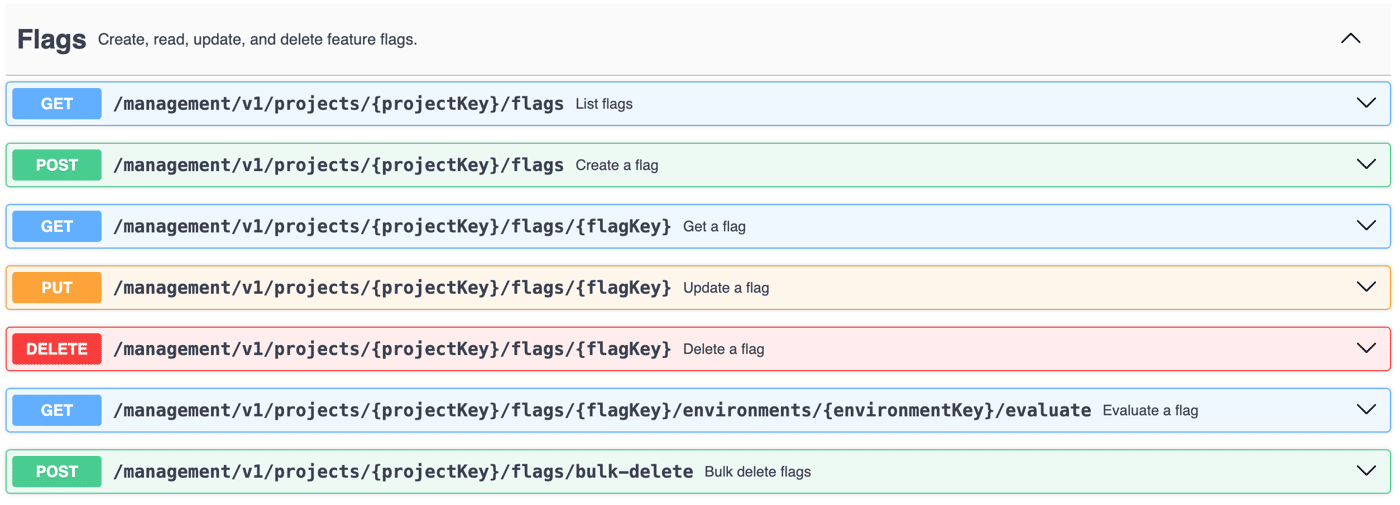
We just shipped two new ways to manage your flags without touching the dashboard: a full REST API, and an MCP server for AI assistants.
I'm the only developer on Zenmanage, and I just shipped two things that changed how I personally build with it every day: a full REST API for managing flags, and an MCP server so I can do the same thing by talking to Claude instead of opening a browser tab.
This isn't really a launch-announcement post. It's more "here's what I built, why I needed it myself first, and what it's actually changed about my day-to-day."
Why the API came first: my deploy workflow needed it
Before this existed, every flag I touched went through the dashboard, by hand. That was fine when I had three flags. It stopped being fine the moment I wanted a flag flip to be part of a deploy instead of a manual step I had to remember to do after one.
Specifically: I wanted my GitHub Actions workflow to roll a flag out automatically once a deploy went green, and roll it back if a deploy failed. No new tooling, no SDK to install in CI — just a curl step in the workflow YAML, hitting the Management API with a token stored as a repo secret:
```yaml
- name: Roll out checkout-v2 after successful deploy
if: success()
run: |
curl -X PUT "https://api.zenmanage.com/management/v1/projects/${{ vars.PROJECT_KEY }}/flags/checkout-v2/environments/production/targets/${{ vars.TARGET_ID }}/rollout" \
-H "Authorization: Bearer ${{ secrets.ZENMANAGE_MGMT_TOKEN }}" \
-H "Content-Type: application/json" \
-d '{"rollout_percentage": 25}'
```
That's the whole integration. No custom Action, no library — just a scoped token and an HTTP call, which is exactly what I wanted from something living inside CI.
The token question I didn't expect: two kinds, for two different jobs
Building this out, I ran into something I hadn't planned for: the token I want sitting in a GitHub Actions secret is not the same kind of token I want for my own day-to-day scripting.
For CI, I use a Management API token — account-level, explicitly scoped (`targets:write` and nothing else for this workflow), issued by me as the account admin. It doesn't care who I am or what my permissions look like on any given day; it just has the scopes it was given when I created it. That matters in CI specifically because I don't want a pipeline to break — or worse, silently gain more access — just because I changed my own role or got locked out of my account for some unrelated reason.
For my own personal automation and, especially, for the MCP server, I use a Personal Access Token instead. A PAT doesn't carry its own scopes at all — it authenticates as me, and inherits whatever I can currently do in my account. Zero config, and it updates itself automatically as my own permissions change. That's exactly what I want when the "automation" is really just me, working, with an AI assistant as the interface.
Having both available turned out to matter more than I expected: admin-issued and stable for anything unattended (CI, webhooks), user-scoped and zero-maintenance for anything that's really just me at the keyboard.
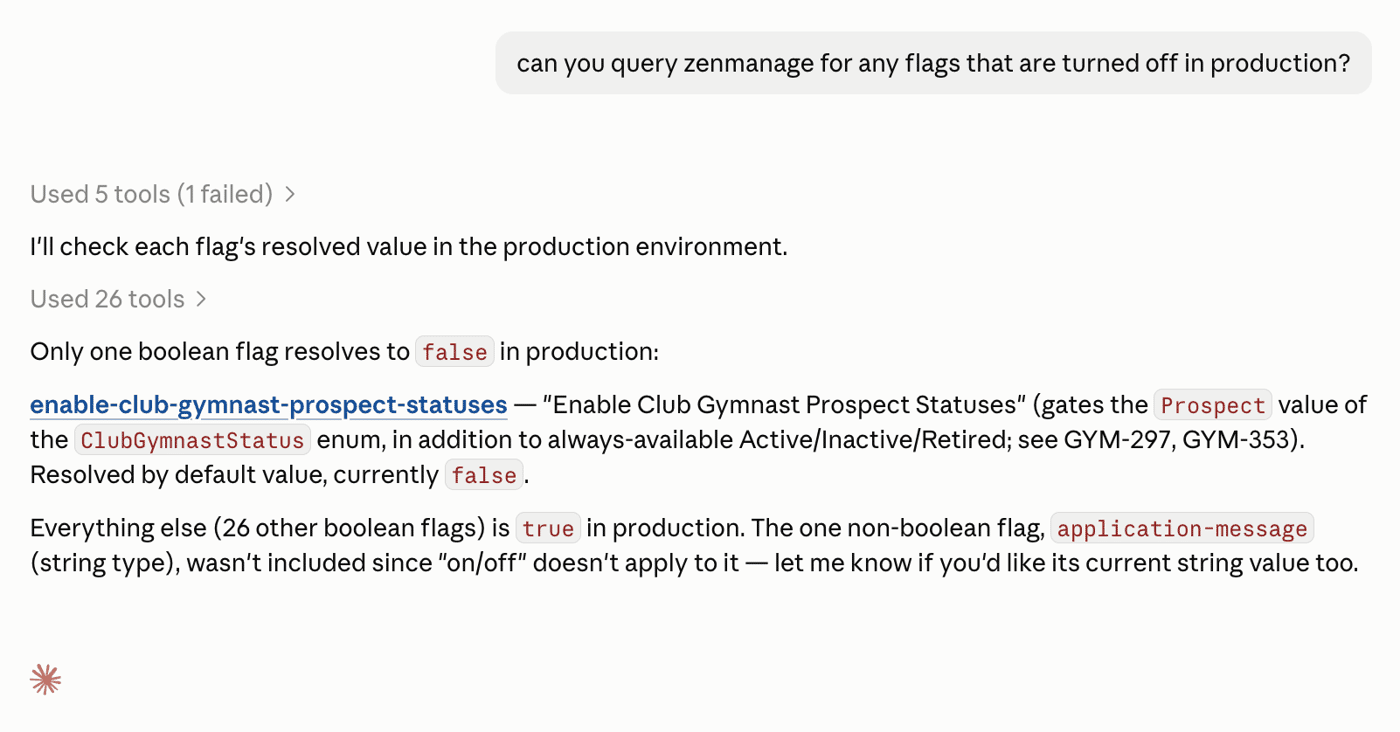
Why I use the MCP server for basically all of my own flag setup now
Here's the part that's actually changed my workflow the most. I don't open the flags dashboard anymore when I'm starting a new feature. I ask Claude to set it up.
```
> I'm starting work on a "checkout-v2" flag for the payments project,
staging environment only, off by default. Set it up.
[calls tool: create_flag]
{ "project_key": "payments", "flag_key": "checkout-v2", "name": "Checkout v2", "permanent": false }
→ Created flag checkout-v2 in payments. Not yet enabled in any environment —
want me to add a staging target next?
```
That "want me to add a staging target next?" is doing real work for me. Before MCP, the mistakes I actually made setting up flags by hand were dumb ones — wrong environment key, wrong project, a flag key that was subtly different from what I typed into the code five minutes earlier. Working through an assistant that has the actual schema in front of it (project keys, environment keys, what flags already exist) catches exactly that class of mistake before it becomes a 20-minute "why isn't this flag doing anything" debugging session.
It's also just faster for reads. Instead of tabbing over to the dashboard mid-coding-session to check "did that rollout actually take effect," I ask:
```
> Did the checkout-v2 rollout in production ever go through?
[calls tool: get_target]
{ "project_key": "payments", "flag_key": "checkout-v2", "environment_key": "production" }
→ Target is at 25% rollout, mode: manual, last updated 6 minutes ago.
Use update_target_rollout if you want to bump it.
```
Same Bearer-token auth as the REST API — the MCP server is genuinely just another client of it, hosted at mcp.zenmanage.com, nothing to install. I hand it my personal access token, same as I would a curl request, and the same scope/permission rules apply either way.
One thing I wasn't willing to compromise on
It's one thing to let a CI script touch a flag. It's a different feeling letting an LLM do it, even my own. The reason I was comfortable shipping this for myself is that the MCP server doesn't introduce any new trust boundary — every call, through either surface, read or write, goes through the same audit log as everything else. If I ask Claude to bump a rollout at 11pm, there's a record afterward of exactly which token did it and what changed. That was non-negotiable before I'd actually use this myself in production, and it's why I built the MCP server on top of the same auth and audit path as the API instead of anything bespoke.
What's next
Both are live and I use them daily. The API's been in my deploy workflow for a few weeks now; the MCP server is newer and I'm still adding tools to it as I hit my own gaps (searching flags by name, finding where a flag is actually referenced in code, surfacing ones that are safe to delete). Docs for both are at http://zenmanage.com/docs if you want to see the full tool/endpoint list.
If you're building solo too — are you letting an AI assistant touch your production config yet, or is that still a line you haven't crossed?

