OnlyFans Clone Developement in 7 Days
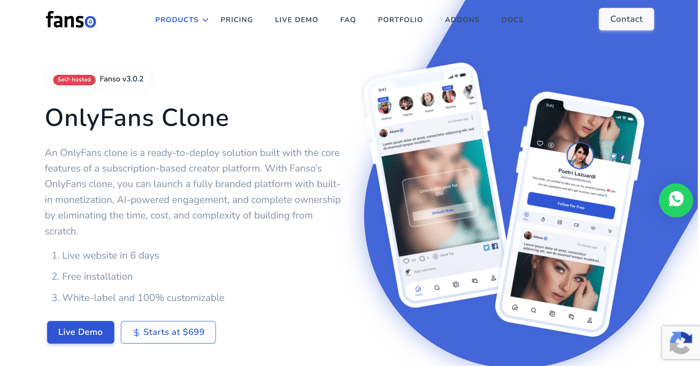
If you are reading this, you are interested in developing an OnlyFans clone at an affordable price and launching it as quickly as possible to validate your niche and market demand.
Note:
- Cost to Build an OnlyFans Clone Platform Using a Clone Script - $700-$1500
- Additional costs such as hosting, domain, SMTP, live streaming, payment gateway fees, legal compliance, and marketing are separate.
- The provider includes installation and deployment support as part of the package, or if you are a developer, you can build it yourself by purchasing the clone script.
These are the steps to build an OnlyFans-style platform. If you have any questions, comment, I will reply. - Onlyfans clone script - https://fanso.io/onlyfans-clone
Before starting, know about the features of an OnlyFans clone in brief.
Admin Features
- Manage creators and users
- Approve creator verification
- Configure commissions and payouts
- Moderate content and reports
- Manage categories, branding, and platform settings
- View analytics and revenue reports
Creator Features
- Create and customize profiles
- Upload photos, videos, audio, and text content
- Offer subscriptions and pay-per-view content
- Go live and interact with fans
- Receive tips and track earnings
- Request payouts
Fan Features
- Discover and follow creators
- Subscribe to exclusive content
- Purchase pay-per-view content
- Like, comment, and send tips
- Watch live streams
- Manage subscriptions and payments
What you need first for building
You need some basic components for building a web app. The checklist is below, check it before starting.
- A domain name - Buy the domain from your favourite provider and pick a domain name that is very relevant to your niche and easy to identify for your audience.
- A hosting server - To run the platform, you need hosting. You can go with VPS or cloud hosting running.
- Minimum requirements - Ubuntu 22.04 with at least 2 CPU cores, 4GB RAM, and 80GB storage to start. You can scale it up as your audience grows. Prices vary from provider to provider.
- A wildcard SSL certificate - Required for security and user trust. Sometimes it comes with the domain provider, or else sometimes you need to purchase it from a third-party provider.
- An SMTP service - This is for sending emails to your platform users and notifying them about password resets and other updates. Software providers such as SendGrid or Brevo handle transactional emails. Create a free account and have your credentials ready.
- A payment gateway – Stripe works well for the SFW niche. For adult niche platforms, CCBill is the recommended option because it is built for high-risk businesses with solid fraud prevention and international payment support.
- Agora.io account - If you want live streaming (and you should), Agora powers it. Sign up for a plan that fits your expected traffic.
The Setup Process: 7 Days to Launch
Day 1-3: Purchase and Deploy
Start by selecting your plan. Most scripts offer two tiers:
- Starter ($699) - Full feature set, and installation support. Best if you want to launch quickly without touching code.
- Professional ($1,499) - Everything in Starter plus full source code ownership, giving you the freedom to modify and build on top of the platform.
Once purchased, share your server credentials with the support team. They'll handle the stack deployment, configure the environment, UI/UX etc., day may extend based on your requirements.
Day 3-5: Legal and Compliance Setup
Don't skip this step. A creator platform without proper compliance is a liability and can shut your business down before it even takes off.
- Privacy Policy - Mention exactly what data you collect, how it's used, and your third-party integrations to meet legal compliance.
- Terms of Service - Define content ownership of the creator, what's permitted, and your payment and refund policies.
- Age Verification - Require government-issued ID and selfie verification before creators publish any content on the platform. This is non-negotiable for platforms allowing NSFW content and age verification is also required for users.
- PCI Compliance - Your payment gateway (Stripe or CCBill) handles this, but make sure it's configured correctly.
- DMCA Process - Set up a clear takedown workflow to handle copyright complaints.
Day 5-7: Configure the Admin Panel
With the platform deployed and legal sorted, log into your admin panel and configure the core settings:
- Commission Rate - Set the commission percentage your platform takes from creator earnings.The typical range is 10–20%, or set it after researching competitors.
- Pricing Controls - Define subscription price floors and ceilings, minimum payout thresholds, and whether free subscriptions are allowed for better earnings and attraction for the platform.
- Payment Gateway - Add your Stripe or CCBill API keys in the platform configuration setting.
- Live Streaming - Paste in your Agora App ID and certificate.
- Social Login - Enable Google and/or Twitter login using developer API keys from each platform.
- Branding - Upload your logo, set your site name, and customize the UI copy without developer assistance. You can change this anytime after the platform is fully built.
Most setup teams will walk you through anything that's unclear, don't hesitate to lean on support during this phase.
Day 4 - 5: Build Content or Niche Categories
Categories drive discoverability. Before creators start signing up, define the content niches that will help creators post content in the right category.
Here are the common categories such as fitness, gaming, music, comedy, education, wellness, and lifestyle. Add a name, short description, and display order for each. You can always expand this list as the platform grows.
The Creator Experience
Once live, this is what the journey looks like for a creator joining your platform:
- Registration and Verification - Creators sign up with basic details, then submit a government-issued ID and selfie for verification. This keeps the platform clean and builds user trust.
- Profile Setup - After verification, creators complete their profile with a bio, intro video, credentials, and profile photo. Alongside creators, their supporters join the platform as well.
- Subscription Pricing - In the pricing tab, creators choose between free or paid access, set a trial period, and configure monthly and yearly rates to stay in competitive advantage.
- Banking Details - Creators connect a bank account or PayPal to receive payouts. The minimum withdrawal threshold is set by you in the admin panel.
- Publishing Content - Posts can be images, videos, audio, text, or live streams. Each piece of content is flagged as free, subscriber-only, or pay-per-view. Creators can also run polls and send exclusive content via direct messages.
- Merchandise and Digital Products - Beyond content, creators can sell physical merch and digital downloads directly through their profile. The platform handles order tracking and delivery status updates.
- Going Live - Starting a live stream takes about 30 seconds. Creators choose free-public or pay-per-view, grant camera/mic access, and they're broadcasting. Viewers can tip during the stream.
- Payouts - Creators request withdrawals from the earnings dashboard. You approve and process them based on the payout schedule you define.
Fan Experience in the platform
Fans interact with the platform through a personalized feed that surfaces content from subscribed creators along with trending recommendations.
The feed shows posts, video updates, audio drops, and live stream notifications, where to increase user engagement in the platform and at the top, active live streams are highlighted so fans never miss a broadcast.
Fans can find their favorite creators using advanced filters based on country, age, category, and content type.
Fans can Engage with likes, comments, bookmarks, and one-time tips. Fans can also flag inappropriate content, which feeds into your moderation workflow.
Growing the Platform After Launch
Going live within a week is not the finish line. Here's where to focus post-launch:
- Expand Monetization - Subscriptions and tips are your baseline. Add layer in ads, crowdfunding, affiliate partnerships, and a merch store to diversify revenue.
- Add Premium Features - As your user base grows, unlock paid add-ons including PPV content in DMs, 1-on-1 private streams, multi-language support, crypto payments, and AI tools like message generators, personalized recommendations, and voice AI to upgrade the platform and help creators utilize it to its full potential.
- Scale Infrastructure – When traffic grows, move to a multi-server setup with CDN integration and image compression to maintain performance, or expand your hosting capacity as needed.
- Invest in Security - 2-factor authentication, 3D Secure payments, and AI-powered age verification are the upgrades that protect both your platform and your creators.
- Market Strategically – There are multiple marketing strategies to onboard creators, such as emailing them directly, running Google Ads to get noticed by both creators and users, leveraging social media platforms like Reddit and Twitter where creator communities are active, and partnering with micro-influencers to spread the word within niche audiences.
Creator platforms primarily grow through creator acquisition and network effects, while ads can help accelerate growth. Focus on recruiting anchor creators in your niche, build a community around them, and let network effects do the work.
Conclusion
Building a subscription platform like OnlyFans doesn't require a massive budget or a development team. With the right clone script, a clear niche, and a week of focused setup, you can own a fully operational OnlyFans-style platform.
Pick your niche, buy the script, launch within a week, and start making money.Fpidddddasas

Nice, one. what would be the if I build using custom development or build from scratch
Both are best, but its depends on your time and money