If you need a content screenshots management app like me?
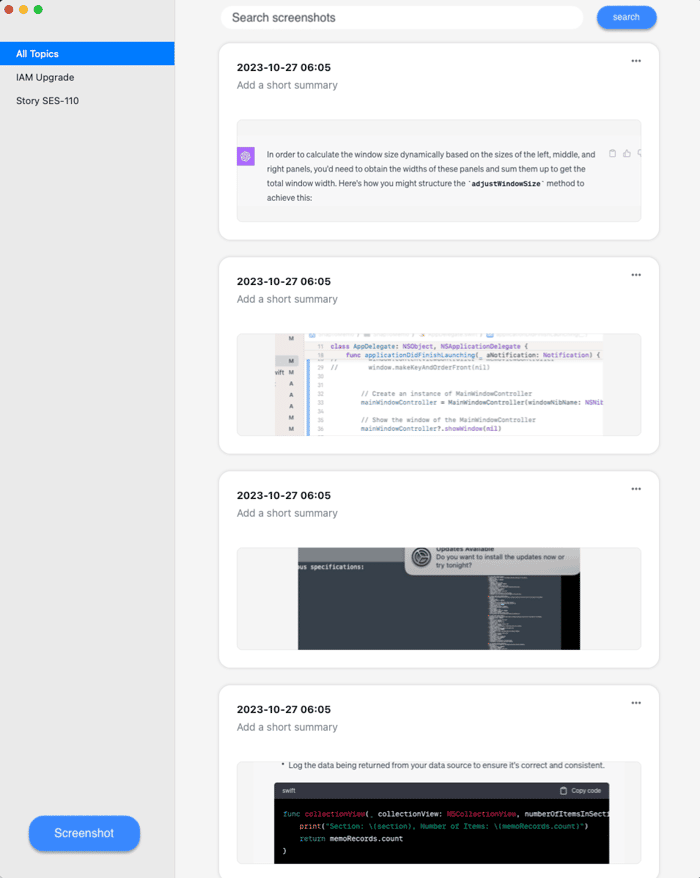
At my day job, I take screenshots on slack msg, part of content at word/excel/slide, document page, or some code snippets,
These screenshots are more like snapshot of original content to reminder me how a decision made and, why I work on something like this. I found this covered my a** sometimes, especially when some sh*t happens or you have to approve to your manager or shareholders why we have things like this.
At beginning I saved these screenshots into a folder, later I saved into Apple note, but neither way I think they are not good for me to manage these screenshots effectively — search screenshots with text in it, or put a simple line of summary and can browse them in a time line (asc or desc).
So I wonder if there anyone else out there have the similar requirement? I would love to collect some feedbacks on my current feature list:
- after screenshot take, extract the text automatically
- screenshot saved with auto time stamped and also you can type in a short summary to it.
- you can organize same topic screenshot togeher
For you more easily to understand what this app focus, you can think instead of UI screenshot management for designer, this is a content screenshot management for other professionals workers :)
