I structured my codebase for AI. Now I ship in hours.
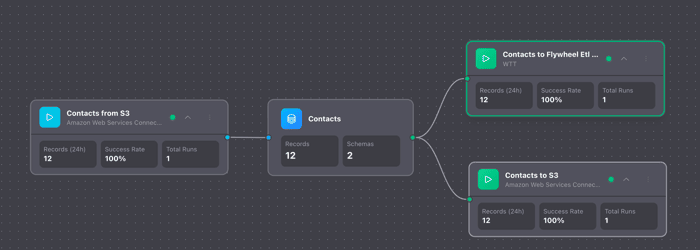
First time posting here—been lurking and commenting for a few days. Building Flywheel (data pipelines for startups) solo. Recently shipped a full feature in under 2 hours. Here's exactly how.
Complete AWS S3 integration—import and export, multiple file formats, chunked processing for large datasets.
Time from first prompt to deployed in production: 1 hour 51 minutes.
Not because I'm some 10x developer. Because I've structured my codebase to let AI do the heavy lifting.
The Solo Founder Problem
As a solo founder, I can't compete on headcount. Big companies have teams dedicated to integrations. I have me and Claude.
So I asked: what if I optimized my entire codebase for AI-assisted development? What if adding a new integration was a 2-hour task instead of a 2-week sprint?
Here's what that looks like in practice.
What Actually Happened
10:00 PM — I typed: "using /provider-setup lets plan out the work for reading from/to S3"
That's a skill file I created—a structured prompt that knows our patterns and conventions. Claude read it, checked how we implemented DynamoDB, and asked two clarifying questions about file formats and export modes.
10:05 PM — Plan approved. I typed: "lets go for it"
Four words. Claude generated the full stack—Go backend, TypeScript frontend, event handlers, API routes, everything.
10:31 PM — Preview working. I could list S3 files in the UI.
10:34 PM — Full import complete. Data flowing from S3 into Flywheel.
10:40 PM — Export working. Data flowing back out to S3.
10:45 PM — UX refinements done. Cleaned up the API.
11:44 PM — Passed /check, CI pipeline running. (Another skill—runs linting, type checks, tests, checks if documents need updating, flags when marketing content should be created. One command, catches everything before CI.)
11:51 PM — Deployed to production.
The Multiplier Effect
This isn't magic. It's architecture.
1. Ruthless consistency — Every provider follows the same structure. Same files in the same places, same naming conventions, same patterns. When Claude learned how we built DynamoDB support, S3 was just "do that again for a different service."
2. Skills over prompts — Instead of explaining our conventions every time, I created a "skill file"—a markdown document that encodes all our architecture decisions. It tells Claude: here's the checklist of files you need to create, here's where they go, here's how we structure configs for different provider types (databases vs. object storage vs. message queues), here's how to reuse shared components.
Claude reads this once at the start of a session and knows exactly how we build integrations. No re-explaining. No "actually, we do it this way." The decisions are already made and documented.
The skill file is about 500 lines and I'm constantly iterating on it—every integration teaches me something new to add. But now every new integration starts from the same playbook, and Claude follows it perfectly.
3. Let AI execute — I didn't write detailed specs. I described what I wanted ("S3 support, JSON and CSV files"), approved the plan Claude generated, and let it work. When there was a bug, I described what I observed ("export failed with this error"), not what I thought the fix should be. Claude diagnosed and fixed it.
The key insight: I spent time upfront documenting how we build things. Now Claude follows that playbook every time. No inconsistency, no forgotten steps, no "how did we do this last time?"
Why This Matters for Solo Founders
The math changes when integrations take 2 hours instead of 2 weeks.
- Want to support a new data source? Ship it tonight.
- Customer asks for S3? Done before they finish their coffee tomorrow.
- Competitor has 10 integrations? You can catch up in a week.
The upfront investment is real—consistent patterns, good documentation, skill files. But once it's there, it compounds. GCS took about the same time. Firestore was similar. Each one gets a little faster.
The Actual Output
This wasn't a prototype. This is production code:
- Full import pipeline with chunked processing
- Full export pipeline with batch file generation
- Multiple file format support (JSON, CSV, JSONL)
- Automatic region detection
- Error handling, logging, the works
All tested, through CI/CD, deployed to prod.
What I'd Tell Other Solo Founders
If you're building with AI tools daily, your codebase is now a prompt. You can fight that or optimize for it.
Start with:
- Consistent file structure across similar features
- A CLAUDE.md (or equivalent) that explains your conventions
- Skill files for repeated work—the upfront cost pays back every time
The 2-hour S3 integration wasn't a one-time trick. It's how I work now. The pattern compounds.
Building Flywheel in public—data pipelines for startups. Happy to answer questions about the AI-native codebase approach.
