I built a Tesla digital wrap editor in two weeks, and someone paid for it
I recently spent two weeks building a Tesla digital wrap editor called Tesla Wrap Studio.
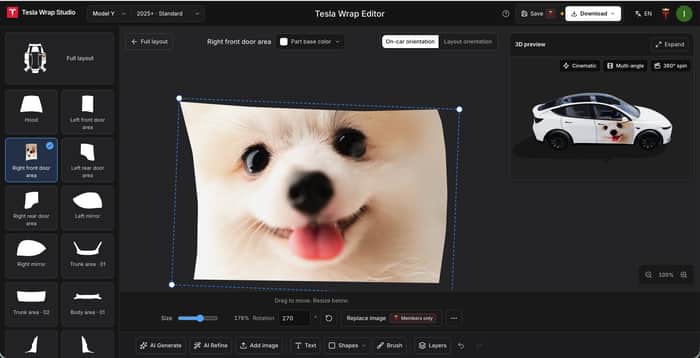
It lets you place your own photos on different parts of the car, adjust their position, size, and rotation, and see the result in 3D as you edit.
By “digital wraps,” I mean changing how the vehicle model looks on your Tesla's screen and in the app. Your actual car stays the same.
For example, you can put a photo of your dog on the door:

Why I built it
The idea came from a friend who's also an indie developer.
He showed me a Tesla digital wrap product and suggested I give it a try. I already own a Tesla, and there were some interesting technical challenges to work on.
I looked into it and found that Tesla already provides image templates for different models on GitHub. You can download a template, add photos, text, or drawings in Photoshop, and export it to use on the vehicle model on your car's screen.
That gives you a lot of freedom. But if you're unfamiliar with image editing, finding the right template, figuring out which area goes where, and editing the image can take some effort.
I also looked at a few competing products. They seemed to emphasize ready-made wrap galleries and AI generation: download a design you like, or describe what you want and let AI generate it.
I was more interested in another situation: you already have a photo you love and want to use it in your design.
Maybe it's a photo of your dog or cat. You already know what you want to put on the car. What would help is an easy way to position, resize, and rotate it, with a preview so you can see how it looks.
That's the process I wanted to simplify: choose a body panel, add your image, make a few adjustments, and see the result.
There's just something about seeing your own dog on there.
What I built in those two weeks
The product currently has three main parts:
- A wrap gallery: Free downloads of ready-made wraps, plus checks to see whether images meet Tesla's file requirements.
- An online editor: Design with your own images and text, or use AI to generate a design, fill in the remaining panels, or make the overall style more consistent.
- A live 3D preview: See changes as you edit, rotate the model, and check whether the image is positioned where you want it.
Here's how that dog photo looks on the door:

The part I most want to get right is designing with your own images, so someone who's never made a digital wrap can bring their idea to life.
Someone paid before I started actively promoting it
I did some SEO work while building the product.
Before I started actively promoting it, I woke up one morning to a payment notification. A user in Japan had found the site through Google and made a purchase on an Android phone.
I'd spent the previous few days working on the product, often late into the night. Seeing someone willing to pay for it made me pretty happy.

Of course, one purchase doesn't mean I've got everything right. But it was a real encouragement at that point.
I've recently started sharing the product in developer communities to hear what people think when they try it for the first time. When you use something every day, it's easy to miss the places where a new user might get stuck.
I'd love your feedback
Here's the product: Tesla Wrap Studio
I'd appreciate your thoughts on a few things:
- When you first land on the homepage, can you tell what the product does? Does it make you want to try it?
- Do you see any problems with the website or product design? For example, is the structure clear and easy to follow? Does the pricing seem reasonable?
- While trying it out, which step feels most confusing or makes you want to stop?
- If you own a Tesla, would you want to create your own digital wrap? If not, is it something you simply don't need, or do the current features and results not appeal to you?
You don't need to own a Tesla to give feedback. I'd also love to hear whether the homepage and editor are easy to understand.
No need to answer every question. Even one honest first impression would help. If something is confusing or frustrating to use, tell me. I'll read every response.

Following up on sniper8192’s point about AI search visibility, I actually ran the check myself.
I asked ChatGPT: “best tools for creating custom Tesla screen wraps/digital wraps in 2026” and it recommended FrunkLab, WrapStudio AI, Tesla Wrap, and Skin My Tesla. Tesla Wrap Studio didn’t come up.
What caught my attention was that it specifically highlighted FrunkLab’s browser-based 3D preview, AI generation and Tesla-ready export which is pretty close to what you’ve already built.
So the interesting part isn’t really the product itself. It’s visibility. FrunkLab and WrapStudio are already showing up in the sources AI is pulling from through comparison content, communities, directories, etc., while Tesla Wrap Studio doesn’t seem to have that visibility yet.
And considering you already got an organic Google sale before even promoting the product, I think there’s probably a similar opportunity with AI search that’s currently going untapped.
I can do the research myself and map out exactly where competitors are getting mentioned/cited, then handle the outreach to those places.
If that sounds useful, happy to send over the pricing, timeline etc.
Worth flagging because there is another post on the front page today about Microsoft's lawyers going after a product with Excel in its name: Tesla Wrap Studio carries the same exposure, and automakers tend to be more aggressive about it than software companies. The other thing I would think about is that a photo of your dog is a one-time job, so this is a distribution problem rather than a retention one, and the buyers who come back are more likely to be detailers and accessory shops doing it for clients than individual owners. Both of those point the same direction: rename it now while you have a handful of customers to notify rather than a few thousand.
Honest first impression from someone who doesn't own a Tesla: the homepage told me what it does in one read, which is rarer than it should be. But the thing that sold it wasn't the feature list, it was the dog on the door. Lead with that image, above the fold, before any text about templates or 3D. People don't buy "an editor", they buy seeing their own dog on their own car.
The part I'd watch: "use AI to generate a design" sits next to "use your own photo" as equals, but your own words say the photo path is the one you care about. Two equal doors dilute the first one. I'd make AI a helper inside the photo flow ("fill the other panels to match"), not a separate entrance.
And the Japan purchase from search before you promoted anything is the most useful data point in the post. That's a keyword someone typed. Find out which one and build the next page around it.
Thanks for taking the time to look at it, especially as someone who doesn’t own a Tesla! Your point about leading with the dog photo really clicked for me. I’m leaning toward making the own-photo experience the main focus, with AI helping people complete the design.
The suggestion to look into the search intent behind that purchase is helpful too. Really appreciate the thoughtful feedback!
That's the right call. One thing worth settling before you rebuild around it: the person who paid — did they arrive wanting a design, or wanting their own photo on a car? If it was the photo, the funnel should open with an upload box, not a gallery, and the gallery becomes the "I don't have a photo yet" fallback one click away.
The AI framing changes with it too. It stops being "generate a design", which competes with the photo, and becomes "we'll finish the rest of the car to match your image". Same feature, but now it removes the reason someone would abandon the upload halfway through.
That pre-promotion organic sale is the strongest signal in this post. On the SEO angle: you're in a niche with very specific, high-intent queries ("tesla screen wrap", "custom tesla display", "tesla wrap template") — low volume, but the person searching is basically already a buyer. Beyond Google, these exact how-to queries are now heavily answered by AI search — when someone asks ChatGPT or Perplexity "how do I customize my Tesla screen," an assistant answers instead of a results page. Making sure those assistants can actually cite your pages (clear headings, plain-language answers to the how-to questions, the editor's capability stated explicitly in text) is cheap to do now, and it compounds as more Tesla owners ask AI instead of Googling.
Thanks! The AI search angle is the part that really stood out to me. I’ve been focused on Google SEO, but I’d also like people asking ChatGPT or Perplexity how to create a Tesla digital wrap to discover the product.
I’ve already published a how-to guide, so making the steps and the editor’s capabilities clear enough to be useful as a source is something I’ll pay more attention to. Appreciate you pointing me in that direction!
ice one. The “use your own photo” use case is clearer than most of the gallery-heavy alternatives.
Getting that first organic sale before any real promotion is a good feeling, especially after the late nights.
Hope the feedback comes in useful and helps you tighten the flow for new users. Looking after yourself while shipping this fast is worth doing too.
Thanks, Stefan! That’s exactly what I want to make easier: taking a photo you care about and turning it into a digital wrap. Getting that sale after all those late nights felt pretty good.
If you get a chance to try the editor, I’d love to hear where anything feels confusing. And thanks for the reminder to get some rest! 🙂
The organic purchase is a useful signal. Do you know whether that buyer was paying specifically for the custom-image editor, or for the broader wrap product?
Good question. I don’t know yet. I can see that they found the site through Google and made a purchase, but that doesn’t tell me which feature motivated them to pay.
Editing with your own photos is the use case I’m most interested in, but I haven’t confirmed whether that’s what this buyer wanted. I’d like to ask what they were trying to create and what made them decide to buy.
How would you go about figuring that out in a situation like this?
The buyer’s actual use case is the key signal now. If you’re open to it, what’s the best email to reach you on?
Sure, you can reach me at support@teslawrap.studio. I’d love to hear how you’d approach understanding what motivated this buyer to pay.
Thanks! I’ve just sent it over.
Looking forward to hearing your thoughts whenever you have a chance.
Great execution on the 3D preview — that's the killer feature. SEO paying off before launch is the dream. One thing: pricing page could show a comparison (your tool vs Photoshop + template time). Curious what the conversion rate is from editor session to purchase?
Thanks! Glad the 3D preview stood out. The Photoshop comparison is a useful suggestion, especially around the steps and time involved in making a wrap.
I don’t have a reliable editor-to-purchase conversion rate to share yet. It’s still early, and I’m gathering feedback on the experience. I’m particularly interested in where people get stuck or decide not to continue.