EchoAPI vs Thunder Client: The Ultimate Showdown for API Debugging in VS Code
If you’re a developer, chances are you spend half your day wrestling with APIs. Frontend, backend, full-stack—it doesn’t matter. APIs are everywhere, and debugging them is as essential as coffee in the morning.
For years, Postman was the default hammer for every API nail. But let’s be real: it’s bloated, it hogs memory, and firing it up feels like starting a small operating system. That’s why developers are flocking to lightweight VS Code extensions that let you test APIs without ever leaving your editor.
Two names keep coming up: Thunder Client and the newer challenger, EchoAPI. Both live inside VS Code, both help you debug APIs—but the similarity ends there. One is a nimble utility knife; the other is basically an armored tank with Wi-Fi.
So… which one should you use? Let’s break it down.
1. Background Check: Who’s Who?
⚡ Thunder Client
Think of Thunder Client as the diet version of Postman. It strips away the fluff and focuses on the basics: sending requests, viewing responses, and doing it all fast. It’s built for solo devs who don’t want overhead, documentation bloat, or collaboration gimmicks—just clean, quick debugging.
🦉 EchoAPI
EchoAPI, on the other hand, said: “Why not go big?” It’s a one-stop shop that bundles API debugging, documentation generation, automated testing, code snippets, offline support, and even team collaboration—directly inside VS Code. Imagine Postman + Swagger + a testing framework all rolled into one, minus the desktop app headache.
👉 In short:
- Thunder Client = pocketknife.
- EchoAPI = tank with rocket launchers.
2. Feature Face-Off
Here’s the tale of the tape:
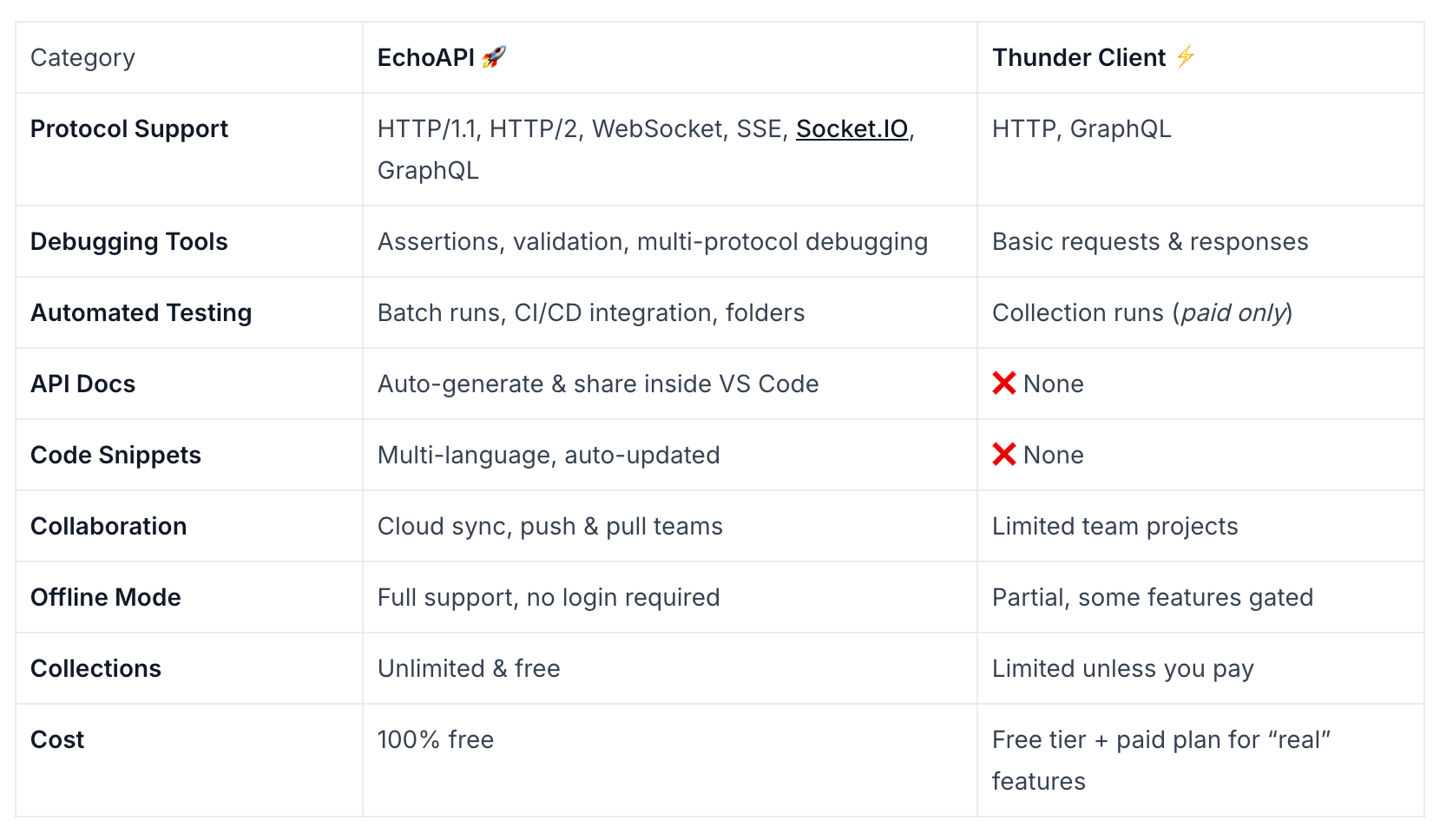
👉 Translation: EchoAPI is the buffet; Thunder Client is the snack bar.
3. UX & Performance
-
Thunder Client: Starts in seconds, light as a feather, and looks almost like Postman—zero learning curve. Perfect for a “hit-and-run” debugging session.
-
EchoAPI: A bit more panels, a bit more weight, but still miles lighter than Postman. The payoff is huge: you get documentation, testing, and collaboration without juggling five different tools.
4. Hands-On Example: Debugging a Login Flow
Both tools can handle the classic login → fetch user info flow. The difference is in how much effort it takes.
-
In Thunder Client, you’ll send the login request, manually set up assertions, grab the token with a script, and reuse it for the user info endpoint. It works—but feels like doing laundry by hand.
-
In EchoAPI, token extraction is one click. Assertions live in the panel. You can wrap the whole thing in a collection, run automated tests, and even generate a shareable report. It’s like having a washing machine that also folds your clothes.
5. Learning Curve vs Payoff
- Thunder Client: 10 minutes to learn, and you’re done.
- EchoAPI: 30 minutes to learn, but it pays dividends forever—especially if you’re working in a team or need docs and testing baked in.
6. Pricing Smackdown
- Thunder Client: Free tier is bare-bones; you’ll pay if you want serious features like collections.
- EchoAPI: VS Code extension is free. Most advanced goodies are already included.
Winner: EchoAPI, hands down.
7. The Verdict
At the end of the day, it’s all about what you need:
- Thunder Client = Swiss Army knife. Great for solo devs who just need a quick poke at an API. Simple, fast, minimal.
- EchoAPI = battle tank with Wi-Fi. Overkill if you only need basic debugging, but unbeatable if you want testing, docs, collaboration, and long-term workflow efficiency.
Either way, both extensions let you escape the clunky gravity of Postman and keep everything inside VS Code—where it belongs.
👉 If you want speed and simplicity, grab Thunder Client.
👉 If you want power and team-ready workflows, EchoAPI is your new best friend.
